

ICT Security: 2026 Guidelines
Practical ICT security guidelines for 2026: key threats, firewalls, IAM, the NIST framework and best practices to genuinely protect your business.
In this article
- Discover how to improve your company's IT security with practical measures, up-to-date tools and an overview of what the NIS2 Directive requires
- What Is Information Security?
- Complying with the NIS2 Directive: An Urgent Priority for Many EU Businesses
- The Most Common Cyber Threats
- Essential Security Measures
- Managing and Governing Information Security
- Key Technologies for Information Security
- Glossary
- Related Insights
Discover how to improve your company's IT security with practical measures, up-to-date tools and an overview of what the NIS2 Directive requires
Welcome to the complete guide to ICT security in 2026, a key resource for understanding and tackling the growing challenges of the digital world. On this page, we explore the core concepts, the most common threats and the essential strategies for protecting your data and systems. This overview gives you a solid foundation, with the option to explore specific topics in more depth on our blog.
What Is Information Security?
Information security, also known as ICT security, deals with protecting IT systems, networks and digital data from unauthorised access, misuse, disclosure, disruption, modification or destruction. In an age where technology touches every aspect of our lives and business, guaranteeing information security is essential for protecting sensitive information, maintaining operational continuity and preserving user trust. Looking at what people and businesses actually search for reveals strong interest in understanding how to defend against threats and which tools and strategies to adopt.
Complying with the NIS2 Directive: An Urgent Priority for Many EU Businesses
The EU NIS2 Directive is now fully operational: transposed in Italy through Legislative Decree 138/2024, it passed its first registration and notification deadlines during 2025, and in 2026 the risk-management obligations apply in full to public and private organisations in strategic sectors — energy, finance, healthcare, transport, digital services, manufacturing. For those in scope the practical shift is no longer becoming compliant, but demonstrating over time that the measures remain effective: periodic verification, incident traceability, supply chain under control. If you are unsure whether your company falls in scope, we cover it on our corporate IT security page.
Measures required under the directive include:
adopting structured cybersecurity policies,
appointing an IT security officer,
continuous monitoring of company systems,
protecting the supply chain.
This guide helps you understand and apply the core principles of NIS2, so you can build a security programme that is both compliant and resilient. For a deeper dive into your specific regulatory obligations, we also recommend reading our dedicated guide to the NIS2 Directive.
The Most Common Cyber Threats
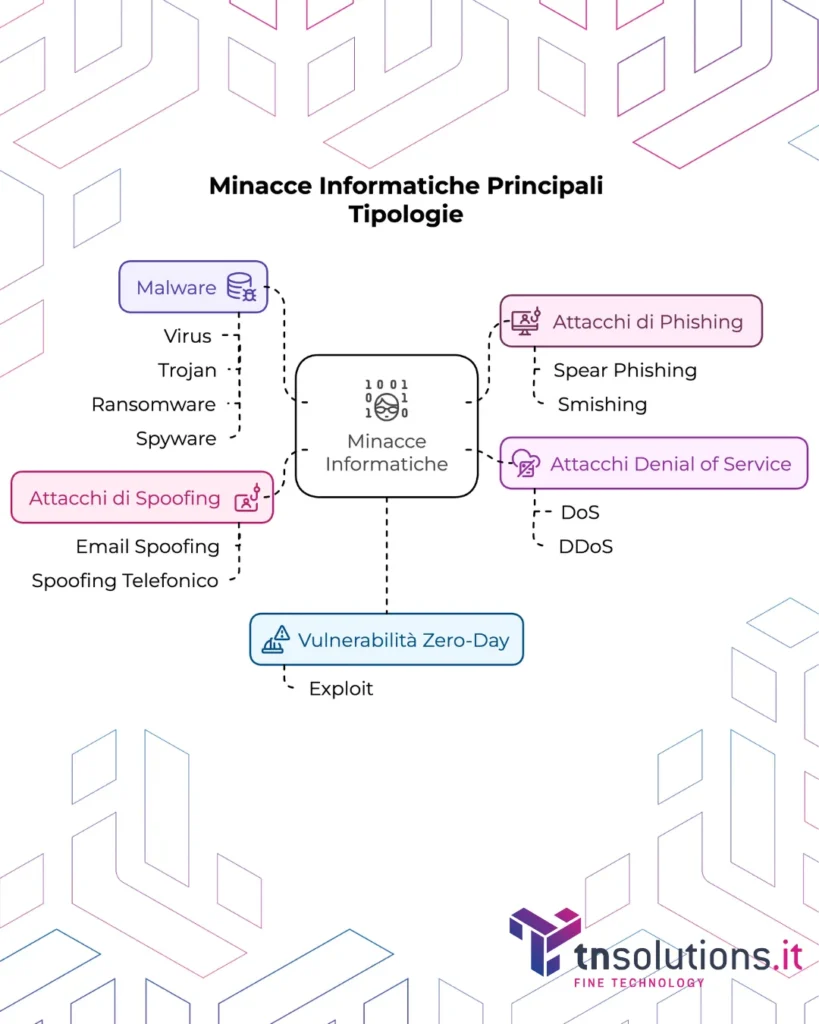
The cyber threat landscape keeps evolving, with new techniques and attacks emerging constantly. Understanding the most common threats is the first step towards defending against them effectively. Here is the updated 2026 breakdown by category:
- Malware: Viruses, Trojans, Ransomware and Spyware
The term malware refers to software created with the intent to damage or disable IT systems, steal data or gain unauthorised access. Several types exist:
Computer viruses are programs that replicate and spread to other computers, often damaging files or the operating system.
Trojans are programs that present themselves as legitimate software but, once run, carry out malicious activity such as stealing information or allowing remote access.
Ransomware is a type of malware that encrypts the victim's files, making them inaccessible, and demands a ransom in exchange for decryption.
Spyware is designed to secretly monitor a user's activity and collect personal information such as passwords and browsing data. A device infected with malware can go on to infect other devices.
Phishing Attacks and Their Variants (Spear Phishing, Smishing)
Phishing is a social engineering technique in which attackers try to trick victims into revealing sensitive information such as passwords, credit card numbers or personal data, often through fraudulent emails or messages that appear to come from trusted sources.
Spear phishing is a form of phishing targeted at specific individuals or groups, making the attack more convincing and increasing its chances of success.
Smishing uses fraudulent SMS messages for the same purpose as phishing. Mass, generic phishing campaigns sent to large numbers of recipients are sometimes referred to as spray phishing.
Denial of Service Attacks (DoS and DDoS)
A Denial of Service (DoS) attack aims to make an online service unavailable to legitimate users by overwhelming the server with an excessive volume of requests.
A Distributed Denial of Service (DDoS) attack is a DoS attack launched from a multitude of compromised computers (a botnet), making it much harder to defend against. What is the main goal of a denial-of-service attack? The primary objective is to make the service unavailable. What are the main goals of a DDoS attack? Here too, the goal is service unavailability.
Zero-Day Vulnerabilities and Exploits
A zero-day vulnerability is a security flaw in software that is unknown to the vendor and therefore not yet patched. The period during which the vulnerability is known to attackers but not to defenders is what is meant by zero-day.
An exploit is code or a technique that takes advantage of a software vulnerability to gain unauthorised access or cause damage. Zero-day vulnerability exploits represent a serious threat.
Spoofing Attacks
- Spoofing is a technique used to disguise one's identity, for example by falsifying the sender's email address (email spoofing) or phone number (caller ID spoofing). Jamming is a related technique used by attackers to disrupt signals rather than disguise identity.
Essential Security Measures
Now that you have an overview, let's look at how to counter cyber threats. Doing so effectively requires implementing a set of security measures at different levels — here are the main ones:
- Firewall: Your Defensive Shield
A firewall is a security system that monitors and controls incoming and outgoing network traffic, blocking unauthorised communications based on predefined security rules. What is a firewall for? It protects the network from unwanted access. Several generations of firewalls exist (next-generation firewalls - NGFW).
Antivirus and Intrusion Prevention Systems (IPS)
Antivirus software is designed to detect, isolate and remove malicious software (malware) such as viruses and worms. What is antivirus software? It is software built to protect against malware. The definition of antivirus makes its purpose clear.
An Intrusion Prevention System (IPS) is a security system that monitors network traffic for suspicious or malicious activity and takes action to block it in real time.
Web Application Firewall (WAF) for Web Protection
- A Web Application Firewall (WAF) is a firewall built specifically for web applications, designed to protect against attacks targeting application vulnerabilities, such as SQL injection.
Endpoint Protection for Devices
- Endpoint protection refers to security solutions designed to protect end-user devices (endpoints) such as computers, laptops and smartphones from threats. An endpoint protection service is a managed service for securing endpoints.
SSL/TLS Security Certificates for Encrypted Communication
- SSL/TLS certificates are used to establish a secure, encrypted connection between a web browser and a server, protecting the confidentiality and integrity of the data transmitted. What is an SSL certificate for? It guarantees the security of web communications. HTTPS (Hypertext Transfer Protocol Secure) is built on the Transport Layer Security (TLS) protocol.
The Importance of Cybersecurity Policies
- A cybersecurity policy defines the rules and procedures an organisation must follow to protect its information assets. What is the goal of a cybersecurity policy? To set out the guidelines for security.
Digital Hygiene: The Fundamental Practices
- Digital hygiene refers to the basic practices for keeping your devices and digital data safe and healthy, such as using strong passwords, updating software regularly and staying alert to online scams.
Managing and Governing Information Security
An effective information security strategy requires proper management and governance. What does governance actually mean in this context? It means organising, monitoring and controlling all the practical activities needed to protect data, networks and IT systems. Let's look at the most significant practical examples:
- Information Security Governance: Defining the Strategy
The information security governance model defines how an organisation manages and implements information security. What is the goal of an information security governance model? To provide a framework for managing security.
The Goal of Information Security
- The goal of information security is to protect the confidentiality, integrity and availability of information. What does information security deal with? It deals with protecting information.
Cybersecurity Framework: A Structured Approach (NIST)
- A cybersecurity framework, such as the one published by NIST (the US National Institute of Standards and Technology), provides a set of standards, guidelines and best practices to help organisations manage and reduce cybersecurity risk.
The ISO 27001 Standard: An International Benchmark
- ISO 27001 certification is an international standard for information security management systems (ISMS).
Business Continuity and Disaster Recovery: Preparing for the Unexpected
- Disaster Recovery (DR) focuses on restoring systems and data after a disruptive event, while Business Continuity (BC) aims to keep business operations running during and after a disruption. Disaster recovery and business continuity are closely interconnected concepts.
Data Breach Management Under GDPR
- A data breach is a security incident involving the destruction, loss, alteration, unauthorised disclosure of, or access to, personal data. In the event of a data breach, the data controller must follow specific procedures set out under the GDPR (General Data Protection Regulation).
Identity and Access Management (IAM): Controlling Access
- Identity and Access Management (IAM) refers to the processes and technologies used to manage and control user access to IT resources. AWS Identity and Access Management (IAM) is one specific implementation of this concept.
Key Technologies for Information Security
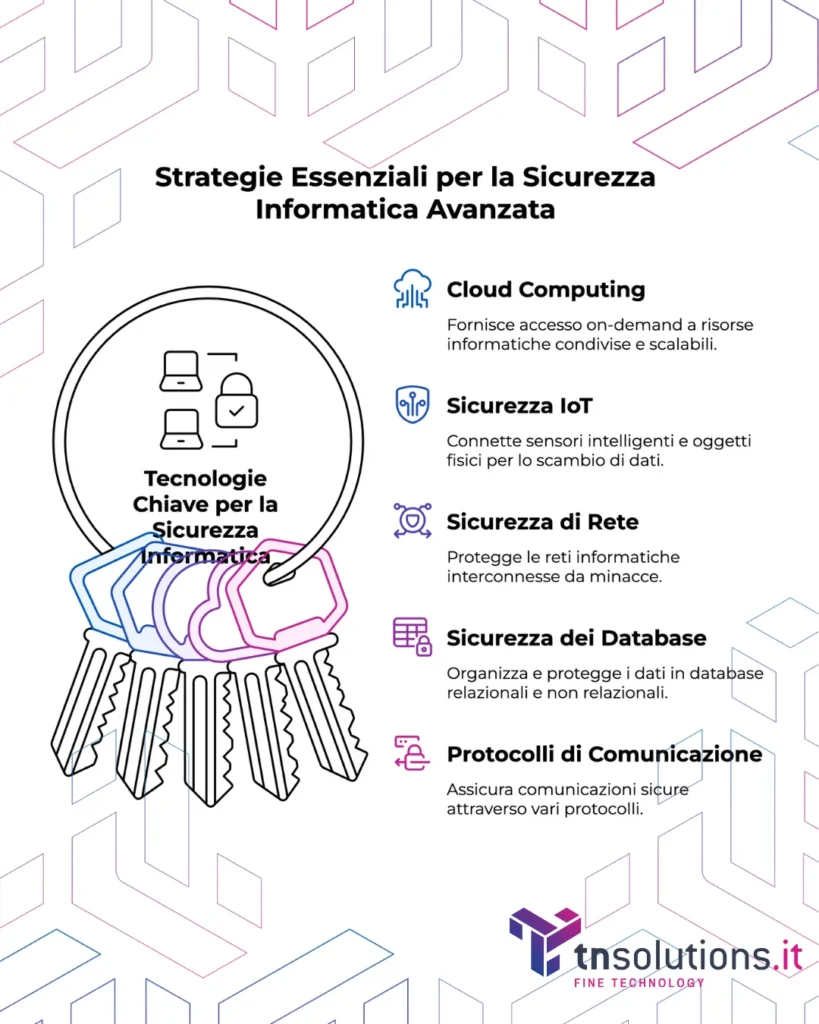
The technologies covered here represent the missing piece for genuinely effective information security. Let's look at the main ones:
- The Role of Cloud Computing in Security
Cloud computing is a model that provides on-demand access to shared IT resources over the internet. Cloud computing is a highly scalable model, and when we talk about scalability, there are two main types. Automatic scalability, where the system adds or removes resources (such as memory, compute power, disk space) automatically based on traffic. Or scalability in the sense of "pay only for what you use", meaning no wasted resources or unnecessary costs.
Security in the Internet of Things (IoT)
- The Internet of Things (IoT) is built on connecting smart sensors and physical objects to the internet, enabling data exchange. We often picture a consumer scenario, like a smart fridge talking to you about dinner, but IoT is applied above all at the enterprise level.
Protecting Corporate Networks
- A corporate network is a set of interconnected devices that communicate with each other and share resources. Typical devices in this context include desktop computers, company laptops, network printers, servers, NAS (Network Attached Storage), firewalls, switches, routers and video conferencing systems. These devices, connected via a wired or wireless network, let employees access shared files, use centralised management software, print documents over the network, or work remotely in a secure way. A well-configured, well-protected network improves operational efficiency, internal collaboration and the protection of company data.
Databases and Data Security
- A database is an organised collection of data. There are relational and non-relational databases. When it comes to database optimisation, it is important to distinguish between relational databases and non-relational databases. Relational databases (such as MySQL or PostgreSQL) use tables of rows and columns and are ideal for structured, consistent data, such as that found in management or ERP software. Non-relational databases (such as MongoDB or Redis) offer greater flexibility and performance with large volumes of unstructured or variable data, such as that generated by apps, e-commerce or IoT. Choosing the right type of database, or combining them, helps improve speed, scalability and resource management.
Secure Communication Protocols (DHCP, FTP, SSH, TLS)
- Beyond the models mentioned above, there are various security protocols. Let's look at the main ones:
The DHCP protocol (Dynamic Host Configuration Protocol) automatically assigns IP addresses to devices within a network.
The FTP protocol (File Transfer Protocol) is used for transferring files between computers.
The SSH protocol (Secure Shell) provides a secure channel for remote system administration.
The TLS protocol (Transport Layer Security), sometimes referred to as SSL (Secure Sockets Layer), is a cryptographic protocol designed to provide security for communications over computer networks.
Glossary
Here is a glossary of the technical terms used in this guide that are worth knowing well:
Access Point (AP): A device that lets wireless devices (such as laptops and smartphones) connect to a wired network, such as a local area network (LAN). It can also function as a router.
Antivirus: Software designed to detect, prevent and remove malicious software (malware) such as viruses, worms and trojans.
ARP Poisoning (or ARP Cache Poisoning Attack): A type of cyberattack in which an attacker sends forged ARP (Address Resolution Protocol) messages onto a LAN, associating the attacker's MAC address with the IP address of another legitimate host, often the default gateway. This can lead to traffic interception.
Cyberattack: An attempt to gain unauthorised access to, damage or disrupt a computer system, network or digital data.
Backup: A copy of data or an entire IT system, stored separately from the original, used for restoration in case of loss or damage.
Business Continuity Management (BCM): A process that identifies the potential impacts of disasters or disruptions on an organisation and provides a framework for building resilience, with the capacity for an effective response that safeguards the interests of key stakeholders, reputation, brand and value-creating activities.
ISO 27001 Certification: An international standard that specifies the requirements for an information security management system (ISMS).
Chief Information Officer (CIO): The executive responsible for an organisation's information technology and IT systems.
Cloud Computing: A model for enabling ubiquitous, convenient, on-demand access to a shared pool of configurable computing resources (such as networks, servers, storage, applications and services) that can be rapidly provisioned and released with minimal management effort or provider interaction. Several models exist, including public, private and hybrid cloud.
Cloud Storage: A cloud computing service model that stores data on remote servers accessible over the internet.
Data Breach: A security incident in which sensitive, confidential or protected data is copied, transmitted, viewed, used or stolen by an unauthorised person.
Database Management System (DBMS): Software for managing databases, allowing data to be stored, retrieved and manipulated efficiently and securely. Examples include relational database systems.
DDoS (Distributed Denial of Service): A type of denial-of-service attack in which multiple compromised systems, often distributed around the world, are used to attack a single target, overwhelming it with traffic and making it unavailable to legitimate users.
Definition of a Computer Network: A description of a set of devices (such as computers, servers, routers) interconnected to share resources and information. It can be local (LAN) or span a wider area.
Denial of Service (DoS): A type of cyberattack aimed at making an online service unavailable by overwhelming it with traffic or exploiting vulnerabilities.
DHCP (Dynamic Host Configuration Protocol): A network protocol used on IP networks to automatically assign IP addresses and other network configuration information to devices.
DNS (Domain Name System): A hierarchical, distributed system that translates human-readable domain names (such as www.example.com) into the numeric IP addresses needed to locate and identify services and devices on the internet.
Endpoint Protection: A cybersecurity approach focused on protecting a network's endpoints, such as desktop computers, laptops and mobile devices, from security threats.
Exploit: A piece of code, a technique or a sequence of commands that takes advantage of a security vulnerability in software or hardware to cause unexpected or unwanted behaviour, often resulting in unauthorised access.
Firewall: A network security system that monitors and controls incoming and outgoing network traffic based on configured security rules. Its purpose is to establish a barrier between a trusted internal network and untrusted external networks, such as the internet. Next-Generation Firewalls (NGFW) offer advanced features.
FTP (File Transfer Protocol): A standard network protocol used for transferring files between a client and a server on a TCP/IP network. It requires specific ports for data and control communication.
HTTPS (HTTP Secure): The secure version of the HTTP protocol, the main communication protocol used for the World Wide Web. HTTPS encrypts communication between the web browser and the web server, providing data security and integrity. It uses the TLS/SSL protocol.
IAM (Identity and Access Management): The framework of policies and technologies used to ensure that only authorised users have access to the right IT resources.
Hyperconverged Infrastructure: A type of IT infrastructure that combines compute, storage, networking and virtualisation resources into a single integrated system.
Internet of Things (IoT): A network of physical objects ("things") embedded with sensors, software and other technologies for the purpose of connecting and exchanging data with other devices and systems over the internet.
Intrusion Prevention System (IPS): A network security system that monitors network traffic for malicious or suspicious activity and takes action to block or prevent it. Often integrated with IDS (Intrusion Detection System) capabilities.
IT (Information Technology): The use of computers and software to manage and process information.
Malware: Malicious software designed to damage, disrupt or gain unauthorised access to a computer system. Includes viruses, worms, trojans, ransomware and spyware.
Managed Detection and Response (MDR): Managed security services that provide continuous threat monitoring, incident detection and threat response.
Mainframe: A type of large-scale computer with high processing capacity, often used by large organisations for mission-critical activities and high data volumes.
Metadata: Data that provides information about other data. For example, the metadata of an image file can include its creation date, size and file type.
NIS2 (Network and Information Security Directive 2): An EU directive aimed at strengthening the security of network and information systems across the European Union.
Open Source Intelligence (OSINT): The collection and analysis of publicly available information from a variety of sources.
Network Performance Assessment: The evaluation of a network's performance.
Phishing: A type of online fraud in which an attacker poses as a legitimate entity (such as a bank or a company) through emails, messages or fake websites, in order to trick people into revealing sensitive information such as passwords, credit card numbers or personal data. Spear phishing is a form of phishing targeted at specific individuals or groups. Smishing uses fraudulent SMS messages.
Proxy Server: A server that acts as an intermediary between clients (such as web browsers) and servers (such as web servers). It can provide anonymity, security and access control.
Ransomware: A type of malware that encrypts a victim's files and demands a ransom to decrypt them.
Recovery Time Objective (RTO): The maximum tolerable time to restore a system or service after a disruption.
Recovery Point Objective (RPO): The maximum amount of data that is acceptable to lose in the event of a disruption.
Router: A network device that forwards data packets between computer networks, determining the best path for sending the data.
Secure Shell (SSH): An encrypted network protocol that allows a secure connection to be established between two computers, often used for remote administration and secure file transfer.
Secure Sockets Layer (SSL)/Transport Layer Security (TLS): Cryptographic protocols that provide security for communications over networks, such as the internet.
Server: A computer or program that provides services to other computers or programs (called clients) over a network. Various types of server exist, such as web servers, mail servers, FTP servers and DNS servers.
Single Sign-On (SSO): An authentication process that allows a user to access multiple applications and services with a single set of login credentials.
Sniffing: The act of monitoring and capturing network traffic passing over a network. It can be used to diagnose network problems or for malicious purposes, such as capturing passwords and sensitive data.
Caller ID Spoofing: The practice of falsifying the caller ID (the phone number displayed) to hide the caller's true identity. There is also IP spoofing, which falsifies the source IP address.
SQL Injection: A security vulnerability found in applications that use SQL databases, allowing an attacker to insert malicious SQL commands that can compromise the database.
Tracker: Code or scripts used to track user behaviour online, such as pages visited and clicks made.
Troubleshooting: The process of identifying and resolving problems in a system or device.
Unified Communications (UC): The integration of different communication methods (such as telephony, email, instant messaging, video conferencing) into a single platform.
Computer Virus: A type of malware that replicates by attaching itself to other programs and spreads from one computer to another. Trojans are another type of malware that presents itself as legitimate software while carrying out malicious actions. Worms are self-replicating malware that do not need a host to spread.
VoIP (Voice over IP): A technology that allows voice calls to be made over IP networks, such as the internet. A VoIP switchboard is a business phone system based on this technology.
Software Vulnerability: A weakness or flaw in software that can be exploited by an attacker to compromise the security or functioning of a system. A zero-day vulnerability exploit is an attack that takes advantage of a vulnerability not yet known to the software vendor.
Wireless Internet Access Point: A device that provides internet access via a wireless (Wi-Fi) connection.
Zero Trust: A cybersecurity model based on the principle of "never trust, always verify". It requires every user and device to be authenticated and authorised before accessing resources.
Related Insights
To explore some of the topics covered in this guide in more depth:
- Ransomware Protection for Business, strategies and best practices against ransomware attacks.
- Business Firewall: How to Choose, with examples of open-source and commercial solutions.
- IT Security Consulting, TN Solutions' consulting service for identifying risks and regulatory compliance gaps.
- Protect Your Business from Advanced Cyber Threats: A Comprehensive Guide, next-generation tools and technologies.
Frequently asked questions
What are some examples of fundamental digital hygiene practices beyond strong passwords and software updates?
Digital hygiene refers to the basic practices for keeping your devices and digital data safe and healthy, such as using strong passwords or updating software regularly.
What specific procedures must a data controller follow in the event of a data breach under the GDPR?
A data breach is a security incident involving the destruction, loss, alteration, unauthorised disclosure of, or access to, personal data. In the event of a data breach, the data controller must follow the specific procedures set out under the GDPR (General Data Protection Regulation).
What are the main security challenges for the Internet of Things (IoT)?
The Internet of Things (IoT) introduces new vulnerabilities into the corporate network. The main challenges include weak built-in device security, weak or default passwords, lack of automatic updates, unencrypted communications, and inadequate access controls. In addition, the sheer number of connected devices expands the attack surface, making it harder to monitor and protect every single endpoint. To mitigate these risks, it is essential to apply IoT-specific security policies: regular updates, strong authentication, network segmentation, data encryption and continuous monitoring.
What are the advantages and disadvantages of using cloud computing from a security perspective?
Advantages: automatic updates, infrastructure managed by experienced providers, built-in redundancy and backups, secure remote accessibility. Disadvantages: less direct control, risk of misconfiguration, dependency on the provider, potential exposure to new attack surfaces.
Beyond access control, what other capabilities do Identity and Access Management (IAM) systems offer?
IAM systems can include multi-factor authentication (MFA), digital identity management, automated user provisioning and deprovisioning, least-privilege management, and auditing and reporting on account activity.
What are the main elements or phases of a cybersecurity framework such as NIST's?
The five phases of the NIST framework are: Identify (identify assets and risks), Protect (apply protective measures), Detect (detect security events), Respond (respond to incidents) and Recover (restore operations and services).
How does an Intrusion Prevention System (IPS) differ from an Intrusion Detection System (IDS)?
An IDS detects and reports suspicious activity without intervening, while an IPS goes a step further and actively blocks malicious traffic in real time, terminating suspicious connections or preventing access to critical resources.
What other functions can next-generation firewalls (NGFW) perform?
NGFWs offer deep packet inspection, application control, web filtering, malware protection, behavioural analysis, and often integrate IPS/IDS and VPN capabilities.
What exactly is a spray phishing attack?
It is a form of phishing in which the attacker sends generic but believable emails to a large number of recipients, hoping that even a small percentage will fall for it. Unlike targeted phishing, it does not require personalisation.
Who are the typical professionals involved in managing a corporate network?
The main roles include: network administrator, system administrator, security analyst, IT manager, help desk technician, Chief Information Security Officer (CISO) and, in some cases, DevOps engineers.
What are the key differences between relational and non-relational databases from a security standpoint?
Relational databases offer granular access controls, ACID transactions and structured encryption. Non-relational databases, which are more flexible, require extra attention to access management and sensitive data, since their looser structures can hide vulnerabilities.
What network configuration information does the DHCP protocol provide?
DHCP provides automatic assignment of IP addresses, along with information such as the default gateway, DNS, subnet mask, WINS server address, IP address lease time, and other customisable options for automatic device configuration.
What is the standard port used for data and control communication in the FTP protocol?
The FTP protocol typically uses port 21 for control (commands) and port 20 for data transfer in active mode.
What are some common use cases for SSH beyond remote administration?
SSH is also used for secure tunnelling, secure file transfer (SCP/SFTP), accessing Git repositories, running remote commands in automated environments, and port forwarding to protect internal services.
What is the difference between an Access Point (AP) and a router?
An Access Point extends an existing network by providing wireless connectivity, while a router manages traffic routing between different networks (e.g. between the local network and the internet) and often integrates AP and firewall functionality.
What is the difference between a home antivirus and a professional/enterprise antivirus?
Modern professional antivirus products include sandboxing, real-time exploit protection, behavioural monitoring, integration with EDR/XDR systems, web filtering, and AI-based analysis for unknown (zero-day) threats.
What are the consequences of an ARP Poisoning (or ARP Cache Poisoning) attack?
This type of attack lets an attacker intercept or manipulate network traffic between two devices, making it possible to sniff data, steal credentials, carry out man-in-the-middle attacks, or disconnect devices from the network.
What are the main phases of a Business Continuity Management (BCM) process?
The phases include: risk analysis, business impact analysis (BIA), defining continuity strategies, operational planning, testing the plans, and continuous improvement based on simulations or real-world events.
What is the difference between Recovery Time Objective (RTO) and Recovery Point Objective (RPO)?
RTO indicates how long a disruption can last before it causes unacceptable damage. RPO indicates how much data can be lost in the event of an incident (e.g. up to the last available backup).
What cloud computing models exist beyond public, private and hybrid, and how do they affect security?
Beyond the classic models, there are also community cloud (shared by several similar organisations) and multi-cloud (using multiple cloud providers). Each model requires different security strategies, particularly around access management, encryption and regulatory compliance.
What kinds of information can be gathered through Open Source Intelligence (OSINT)?
OSINT can include: publicly available email addresses and phone numbers, company information on LinkedIn, technical details from WHOIS and Shodan, metadata from online documents, and even social media traces used for social engineering.
What techniques are used in phishing attacks?
Beyond deception via email, messages or fake websites, other techniques include: vishing (phishing by phone), smishing (via SMS), pharming (DNS manipulation), QR code phishing, and spear phishing targeted using data gathered through OSINT.
What are the security benefits of using a proxy server?
A proxy server can anonymise traffic, filter malicious content, block unauthorised sites, log and control network usage, and act as a barrier between the user and the internet, limiting direct exposure.
What is the main purpose of the DNS (Domain Name System) protocol in relation to information security?
DNS translates domain names into IP addresses, but it can also be used to block malicious sites, implement content filters, and detect suspicious activity (such as unusual DNS usage for C2 communications).
What are the distinctive characteristics of caller ID spoofing compared to other forms of spoofing?
Caller ID spoofing involves falsifying the calling number, often to trick the victim into answering or providing information. It differs from IP or email spoofing because it exploits trust in the phone network.
How can a SQL Injection attack compromise a database?
The attacker inserts malicious SQL commands into an input field, gaining access to confidential data, modifying tables, or even executing commands on the server. It is one of the most serious vulnerabilities found in unprotected web systems.
What are the core principles of the Zero Trust security model?
The Zero Trust model is based on three principles: never trust anyone (not even inside the network), always verify identity, and limit access to the minimum necessary. Every access request must be authenticated, authorised and monitored.
Technology partners






Want to discuss it with our team?
We analyse your infrastructure for free and propose the most suitable solution.