

Network Cables: Types and Features
Network cables: what are the main types and features? Which ones are the most reliable? Here's a guide to choosing the right one.

In this article
Network cables are still very important when it comes to connecting devices like a TV or a desktop computer, despite the speed improvements made possible by Wi-Fi networks.
Ethernet cables, in fact, deliver excellent performance in terms of connection stability — provided, of course, that the router is nearby.
You should know, though, that network cables are not all the same: they differ both in the connection speeds they support and in the category they belong to.
Network cable categories
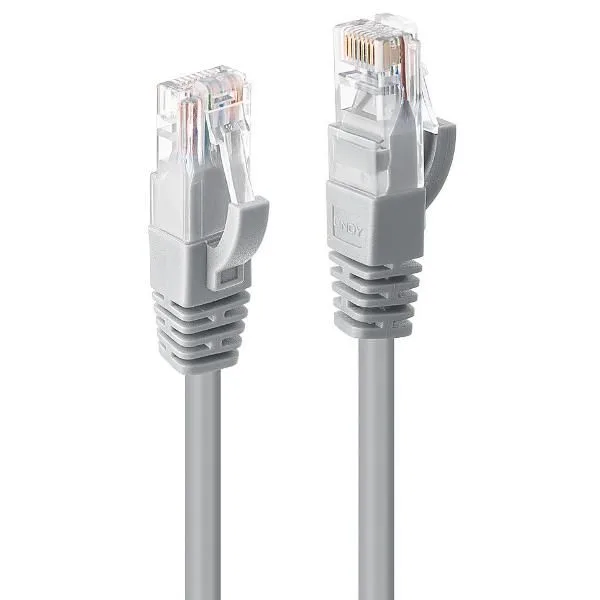
All network cables use an RJ45 connector, meaning there's no difference in connectors regardless of the cable type used.
What changes between cable categories is the level of performance they can achieve; another aspect worth considering is their resistance to interference.
Let's look at the details...
Cat 5 network cables can handle a maximum speed of 100 Mbps, with bandwidth capped at 100 MHz — though it's worth noting that this category is now largely obsolete.
Slightly better performance is offered by Cat 5e cables, where the "e" stands for "enhanced": these are an improved version of Cat 5 cables, with a maximum supported speed of 1000 Mbps.
Next come Cat 6 cables, with speeds up to 10 Gbps and bandwidth up to 250 MHz; a further improvement comes with Cat 6A cables, which double the bandwidth to 500 MHz, helping to contain interference.
The last category worth mentioning is Cat 7, offering 10 Gbps speeds and a 600 MHz frequency that minimizes interference in any environment.
What you need to know about network cable categories
As you might expect, each network cable category corresponds to a specific speed, while Cat 7 cables also deliver a reduction in interference. It's also worth noting that Cat 6e is a non-standardized designation that isn't formally recognized at the international level.
As mentioned, all these cables use the RJ45 connector, which guarantees compatibility with all the network devices — switches, routers and so on — they're used with.
It's easy to see that transmission speed is affected by the speed of every component involved. If you own a Fast Ethernet device, there are no real constraints on which cable to use, since the maximum speed is capped at 10/100 anyway.
Choosing the right cable
If you're using a 10-Gigabit device in an environment that's particularly exposed to interference, you should use Cat 7 cables.
You can also use Cat 5 or Cat 5e cables, but keep in mind that data will still be transmitted, just at a limited speed; it's best to avoid Cat 6 and Cat 6A cables in that scenario, since they carry a higher risk of interference.
If interference isn't a concern, Cat 6 and Cat 6A cables work perfectly well with 10-Gigabit devices — in fact, they're necessary to make full use of the available bandwidth. In that case, Cat 5 or Cat 5e cables aren't out of the question either, but data will be transmitted at reduced speeds.
Generally speaking, with Gigabit devices you shouldn't go below Cat 5e, otherwise the bandwidth can't be used to its full potential: Cat 5 cables will still carry data, but — as already noted — at a more limited speed.
Not just speed: shielding matters too
Evaluating connection speed is only one of the factors to consider when buying an Ethernet cable. Another aspect that shouldn't be overlooked is shielding, which is indicated on cables with specific abbreviations.
The UTP designation refers to standard cables with no additional shielding; the FTP and STP designations, on the other hand, mark cables fitted with extra shielding, which helps protect further against interference.
Maximum Cable Length and Power over Ethernet
Every category above is also bound by the same physical limit: 100 metres for a single Ethernet run (patch cables included), which comes from the standard's specification for signal attenuation over copper — beyond that distance the signal degrades enough that a switch or NIC can no longer reliably read it. Runs longer than that need a switch or media converter in between, or a different medium (fibre) altogether.
Power over Ethernet (PoE) is the other practical factor to plan for, since it's what powers most IP cameras, Wi-Fi access points and VoIP phones over the same cable that carries data. The three common standards draw different amounts of power at the device: 802.3af (PoE, up to roughly 15 W), 802.3at (PoE+, up to roughly 30 W) and 802.3bt (PoE++, up to roughly 60-90 W depending on type). Cat 5e is generally adequate for PoE and PoE+ at typical office run lengths, but higher-power PoE++ deployments benefit from Cat 6 or better, since more current through the cable means more heat, and thinner or lower-grade cabling handles that heat less well over long runs.
One more practical detail worth knowing when running cable through false ceilings, risers or other building spaces: fixed cabling used in these installations is required to meet a fire-reaction rating for its outer jacket (in the EU, this falls under the Construction Products Regulation, with cable classes such as Cca or B2ca commonly specified for office buildings), rather than being a purely optional upgrade.
A solution just a click away
Need help designing or troubleshooting your company network, or choosing the right cabling for your setup? The TN Solutions team can help: contact us for a no-obligation consultation and we'll help you find the best solution for your needs.
Frequently asked questions
What are the categories of Ethernet network cables?
The main ones are Cat 5 (100 Mbps, now largely obsolete), Cat 5e (1000 Mbps), Cat 6 (up to 10 Gbps over 250 MHz), Cat 6A (double the bandwidth at 500 MHz) and Cat 7 (10 Gbps with minimal interference thanks to 600 MHz shielding).
Do all network cables use the same connector?
Yes. All network cables use the RJ45 connector, so compatibility with switches, routers and other network devices is guaranteed regardless of the cable category you choose.
How do you choose the right network cable?
It depends on the devices and the environment: 10-Gigabit devices exposed to electromagnetic interference need Cat 7 cabling, while standard Gigabit devices in interference-free settings are well served by Cat 6 or Cat 6A cables.
What do the acronyms UTP, FTP and STP mean on network cables?
They indicate the level of shielding: UTP identifies standard cables with no additional shielding, while FTP and STP indicate cables with extra shielding layers, which help protect the signal from electromagnetic interference in demanding environments.
Technology partners






Want to discuss it with our team?
We analyse your infrastructure for free and propose the most suitable solution.