

Magento SEO Optimisation: Tips for E-Commerce
Optimise your Magento e-commerce store for SEO with tips on URLs, images, headers and templates. Improve your Google indexing.

In this article
Why optimise SEO for a Magento e-commerce site?
Most online e-commerce sites are not SEO-optimised. Starting from this premise, improving organic ranking — and therefore optimisation — is essential for the correct indexing of your e-commerce store in search engines, Google above all. Having the best products and/or services on offer isn't always enough: the key is providing optimised content on the pages that describe your products. The product page, for instance, acts as a guide for the reader, who should find images, technical specifications, reviews, prices, and related or alternative products.
To optimise your search engine indexing, don't overlook URLs, headers, catalogue and product pages, image alt text, link titles, the template and the sitemap. SEO management should start right from the Magento installation. It's recommended to install the latest stable version available and subsequently keep the CMS updated whenever a new version is released.
How to optimise SEO-friendly URLs in Magento
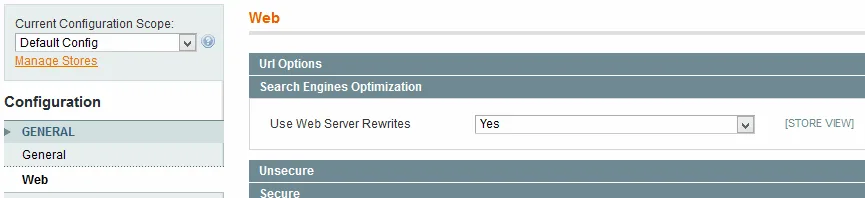
URL structure is a very important organic ranking factor for any site, especially for an e-commerce site.
Enable Magento's URL rewriter (specifically, make sure that when the server receives an HTTP request for a given URL, that request gets "converted" into a request for a different URL, the one that will actually generate the web page content). To do this, go to "System" / "Configuration / Web" and select Yes on the "Search Engine Optimization" tab, under "Use Web Server Rewrites"
Remove index.php from all URLs (edit the .htaccess file in the root of your Magento installation, on line 123, replacing RewriteBase /magento/ with RewriteBase /)
Optimise the URL rewriter for tags, reviews, and the search results page
Customise the product URL using the product title with template variables
How to optimise page headers
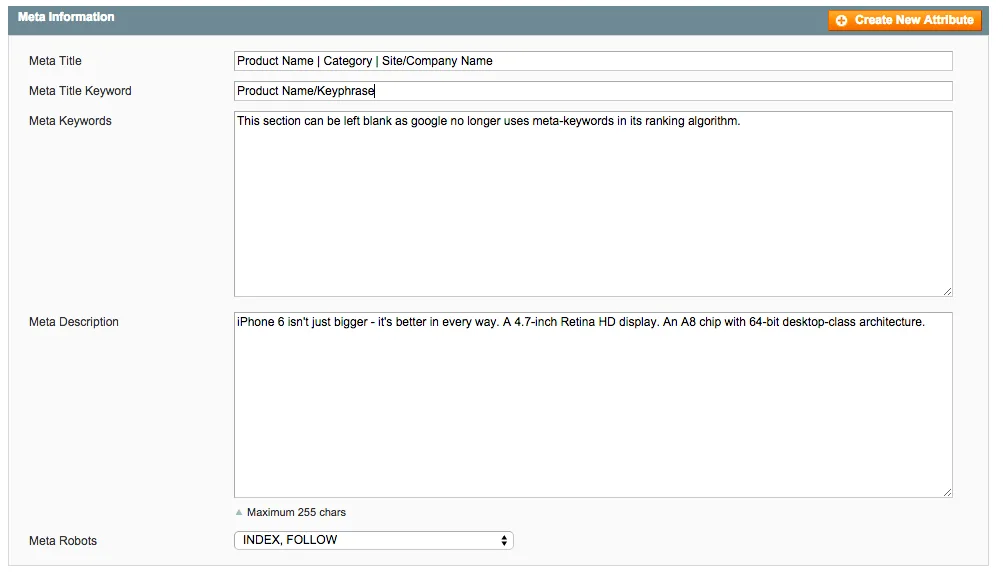
When we talk about header optimisation for pages, we mean optimising the title tags and meta data of your Magento pages. The page title should always be descriptive, should catch readers' attention, and should ideally include at least some of your keywords. The title tag should be between 10 and 70 characters long (spaces included). The meta description appears below the title; it's meant to contain a brief description of the page's content. It's not visible on the web page itself but accompanies the title tag in the SERP: when someone searches, Google pulls the meta description and displays it alongside the title. The best meta description is between 70 and 160 characters long (spaces included). The meta keyword tag is the least important compared to the title and description, but it plays a strategic role in maximising the performance of PPC campaigns with Google Ads. It's essential that keywords are relevant to the page's content, not duplicated, and no more than 5.
How do you optimise images and content in Magento?

An often-overlooked aspect of Magento is how you manage images. Writing the ALT tag, for example, is a detail that tends to be underestimated, yet it's extremely important for SEO, since it helps you get more traffic, particularly through image search indexing. That's not all: writing the ALT tag also gives visitors a useful description of the image.
Template optimisation
The Magento logo is, by default, an H1; that can work fine on the homepage, but on internal pages it's better to use headings above H3. That said, the single most important action is managing the title, customising it based on the page you're on (for example, the category name or the product name). It's essential to avoid overusing heading tags in places where they're not needed and where they aren't reinforced by relevant keywords (e.g. inside sidebars). There's no reason to use static text with no keywords of interest inside a heading tag; if it's purely a layout matter, you could simply swap the tags out and work on the stylesheets instead. These simple precautions let you make the most of H1...H6 tags within the actual page content, without any "noise" elements getting in the way.
How do you create a sitemap for a Magento e-commerce site?
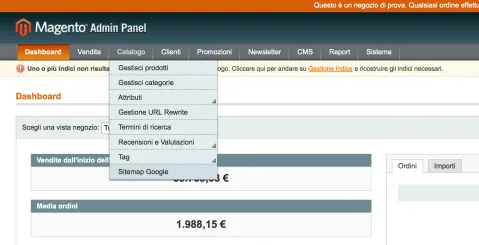
A sitemap is an XML file that provides search engines with information about your site. The data in a sitemap can include: site URLs, last modification date and update frequency. You can create a sitemap manually using a text editor. A sitemap is a simple way to let search engines know where your real content lives, and it helps get individual site pages indexed quickly. Whenever there are inventory changes (new products, new categories, etc.), the sitemap needs to be regenerated. This ensures that the pages and links to be indexed are always up to date with the latest version.
Frequently asked questions
Why are SEO-friendly URLs important for a Magento e-commerce site?
Because URL structure is a very important organic ranking factor: enabling Magento's URL rewriter and removing index.php from URLs produces cleaner addresses that are better indexed by search engines.
How long should title tags and meta descriptions be in Magento?
The title tag should be between 10 and 70 characters long (spaces included) and descriptive, while the ideal meta description is between 70 and 160 characters and briefly summarises the page content in the SERP.
Why is the image ALT tag important for e-commerce SEO?
Because it helps generate more traffic through image search indexing and gives visitors a useful description of the images — an aspect that's often overlooked when managing Magento.
When should an e-commerce sitemap be regenerated?
Whenever there are inventory changes, such as new products or new categories, to make sure the pages and links to be indexed always reflect the latest version of the catalogue.
Technology partners






Want to discuss it with our team?
We analyse your infrastructure for free and propose the most suitable solution.