

Galera Cluster HAProxy for WooCommerce: Technical Analysis of a High-Availability Open Source Architecture
Galera Cluster HAProxy for WooCommerce: how a 3-node open source setup works, where it fails and what production needs. Practical B2B analysis.

In this article
- At a Glance: What the Lab Demonstrates
- Lab Architecture
- How a Galera Cluster Works, Without Misleading Simplifications
- Galera Cluster HAProxy: The Single Entry Point to the Database
- Startup and Shutdown: The Problem Almost Everyone Underestimates
- Critical Analysis: What Works and What Production Still Needs
- What Level of Reliability Does Your Business Really Need?
- The Value of Open Source for Businesses
- How We Work on These Projects at TN Solutions
A three-node MariaDB Galera cluster behind HAProxy is a proven way to keep a WooCommerce database online when a server fails, using open source software only and no license fees. In this article we take apart a lab built by our technical team: what the Galera Cluster HAProxy setup does well, where it breaks, and what it takes to run it in production at a real company.
This is not an installation guide. It is the kind of assessment we carry out when a customer asks: "can my online store, my web-based management system or my portal stay up if a server goes down, without buying enterprise licenses?" The short answer is yes, provided you design three things properly: the database, the entry point and the restart procedures.
At a Glance: What the Lab Demonstrates
- The store database survives the loss of a node. Three MariaDB Galera nodes each hold a full copy of the data, and an order is confirmed only after the cluster has certified it.
- The application notices for a few seconds at most. WordPress talks to a single address (HAProxy): requests in flight on the failed node fail, and the next ones go to a healthy node.
- Restart after a shutdown is automatic, thanks to a script that picks the right node from which to re-bootstrap the cluster.
- Everything is open source: Ubuntu Server, Apache, PHP, ISPConfig, MariaDB, Galera, HAProxy and Docker.
- But a lab is not a production infrastructure. Everything runs on a single virtual machine, and the HAProxy health check cannot see the real state of Galera. We explain below how to close these gaps.
Lab Architecture
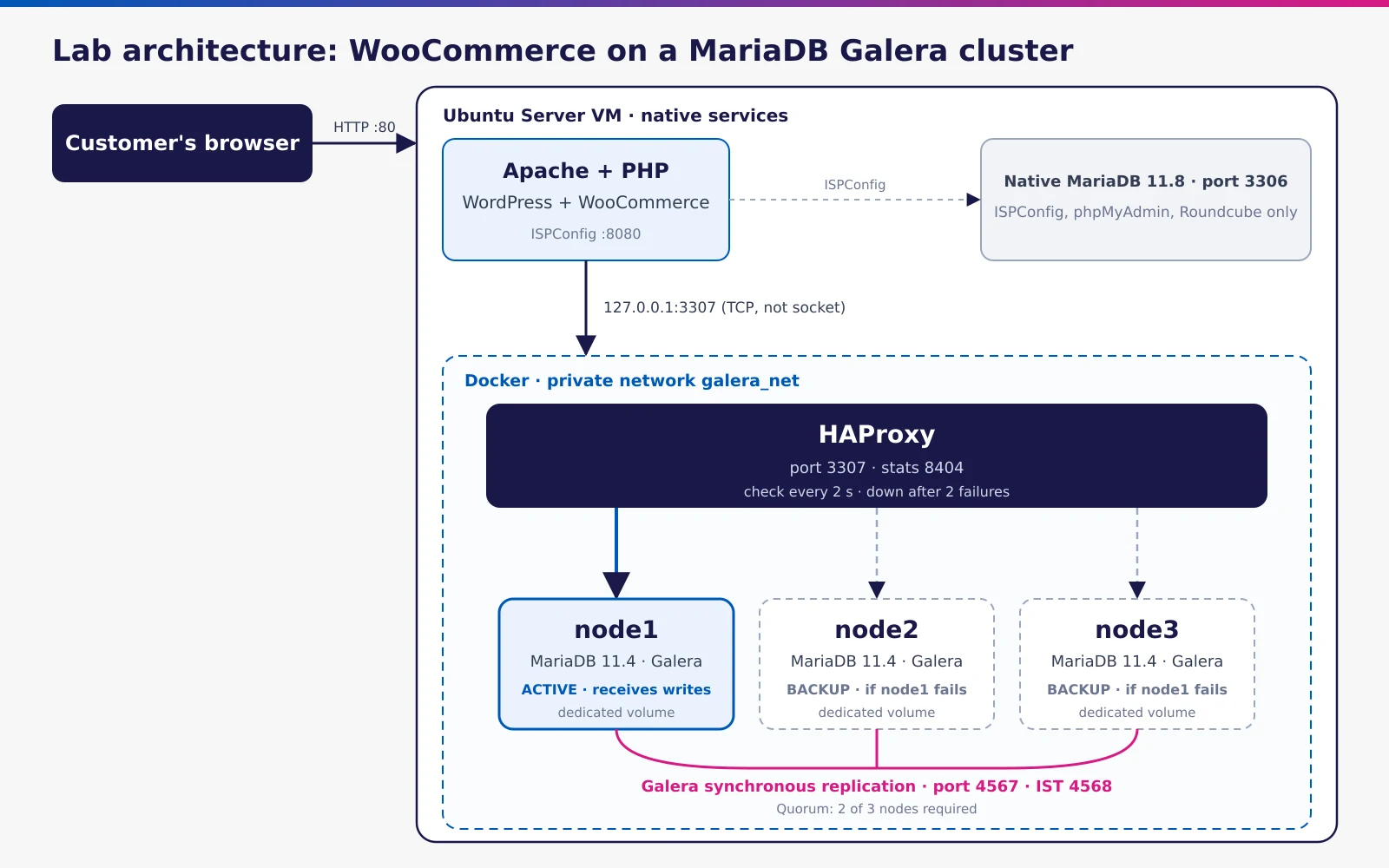
The lab is a WordPress store with WooCommerce on a single Ubuntu Server VM (3 GB of RAM, 40 GB of LVM disk, bridged network with a fixed IP). The VM has two roles:
- It hosts the native services: Apache, PHP, the ISPConfig hosting panel and a system MariaDB.
- It acts as the Docker host for the cluster that holds the store database.
Web Layer: Apache, PHP and ISPConfig
The web layer is installed directly on the VM and managed with ISPConfig, an open source hosting panel comparable to cPanel or Plesk. Apache receives requests and selects the site by name (VirtualHost), PHP runs WordPress, and ISPConfig creates sites, databases and system users without manual edits to configuration files. Each site lives in its own folder under a dedicated user, so it stays isolated from the others.
Two Databases with Separate Jobs
This is a design choice we recommend even outside the lab:
| Database | Where it runs | Port | Contents |
|---|---|---|---|
| Native MariaDB 11.8 | System service | 3306 | Only the internal databases of ISPConfig, phpMyAdmin and Roundcube |
| Galera cluster (MariaDB 11.4) | Three Docker containers | 3307, via HAProxy | Only the store database |
The panel cannot work without its own MariaDB, so it stays where it is. The store lives on a separate database: you can work on the cluster, stop it or rebuild it without touching the panel, and vice versa. Keeping management data apart from business data limits the blast radius of every failure and every maintenance task.
How WordPress Connects to the Cluster
In wp-config.php, WordPress points to 127.0.0.1:3307. This detail matters: with localhost, the PHP MySQL client tries the local Unix socket and would end up on the native MariaDB, not on the cluster. It is a classic mistake that produces a site that "works" but is connected to the wrong database.
The database holds products, orders, customers, settings and also the WooCommerce sessions and carts. Files (code, plugins, theme, uploaded images) stay on the VM disk.
Docker: Containers, Volumes and Network
| Container | Image | Role | Ports exposed to the VM |
|---|---|---|---|
| node1, node2, node3 | mariadb:11.4 | Galera nodes | None |
| haproxy | haproxy:lts | Proxy in front of the nodes | 3307 (database), 8404 (statistics) |
Three elements hold this layer together:
- Dedicated volumes: each node stores its data in its own volume. Containers can be recreated and the data stays.
- Private network: the four containers find each other by name on an internal network; only HAProxy is reachable from outside.
- Declarative configuration: a single Compose file describes everything, the Galera configuration is shared by all nodes, and passwords are kept in an
.envfile with restricted permissions.
All containers use the unless-stopped policy: if one crashes on its own, Docker restarts it. After a host reboot, however, the Galera nodes must not all restart on their own at the same time: the policy has to be coordinated with the startup script described below and tested, otherwise nodes without a founder end up in a restart loop.
How a Galera Cluster Works, Without Misleading Simplifications
The three nodes form the store_cluster cluster and each one holds a full copy of the database. These are the concepts that really matter when you need to guarantee service continuity.
"Virtually synchronous" replication. At commit time, the transaction is sent to all nodes and certified: every node runs the same deterministic check, so they all reach the same outcome. No confirmed order can be lost because a node goes down. However, applying the changes on the other nodes happens right afterwards, asynchronously, so for a few milliseconds a node may lag slightly behind. With a single node handling reads and writes, as in the lab, this is not an issue; if you spread reads across several nodes, enable wsrep_sync_wait for critical reads.
Multi-master, used as single-writer. Every node can accept writes, but two simultaneous writes to the same row from different nodes cause a certification conflict, which the application receives as a deadlock. WooCommerce frequently updates the same rows (stock, sessions, options), so the lab's choice of one writing node at a time is the right one.
Quorum. The cluster works only if it can see a majority of nodes: with three nodes, two are needed. That is why there are three nodes: with two, the sudden loss of one (a crash or a network failure) leaves the other without a majority and the cluster stops. Quorum prevents split brain, where two isolated groups each believe they are the valid cluster and diverge.
Rejoining a node: IST and SST. A node that comes back after a short absence only fetches the missing transactions (IST, port 4568) from its peers' replication cache, the gcache. If it has been out for too long, it receives a full copy (SST). The lab uses rsync, which blocks the donor node for the entire copy.
Flow control. If a node applies changes more slowly than the others, the cluster slows everyone down to wait for it. A node on a slow disk or with little RAM degrades the performance of the whole cluster, so resources must be sized uniformly.
The lab's shared configuration is minimal and correct:
[galera]
wsrep_on                 = ON
wsrep_provider           = /usr/lib/galera/libgalera_smm.so
wsrep_cluster_name       = store_cluster
wsrep_cluster_address    = gcomm://node1,node2,node3
wsrep_sst_method         = rsync
binlog_format            = ROW
default_storage_engine   = InnoDB
innodb_autoinc_lock_mode = 2
bind-address             = 0.0.0.0
binlog_format = ROW and innodb_autoinc_lock_mode = 2 are Galera requirements, not preferences. Each node's name and address are set in the Compose file, and each node uses a reduced 128 MB InnoDB buffer to fit in the VM's memory.
Galera Cluster HAProxy: The Single Entry Point to the Database
WordPress does not know a cluster exists: it talks to HAProxy, which forwards each connection to a healthy node. If you want a deeper look at how the load balancer works in general, see our complete guide on what HAProxy is and how it works.
In the lab, HAProxy is configured as follows:
- One active node, two on standby. All connections go to node1; node2 and node3 are marked
backupand receive traffic only if node1 is down. This way, under normal conditions, only one node writes at a time. - Health checks every 2 seconds, using a dedicated user with no password and no permissions on the data, restricted to the internal network. A node is marked down after 2 failed checks and back up after 3 successful ones.
- Immediate retry (
retriesandoption redispatch): if opening a connection fails, HAProxy retries it on another node. Queries already running on the failing node do fail, so during an outage some requests may return errors for a few seconds. - Dynamic name resolution through Docker's internal DNS: HAProxy can start before the nodes and follows their IP addresses when they are recreated.
- Statistics page on port 8404, showing the real-time status of each node.
Every WordPress page opens a new database connection, and that is what makes the switch between nodes transparent: the next request simply goes to the healthy node, and the cart is preserved because it lives in the replicated database.
Startup and Shutdown: The Problem Almost Everyone Underestimates
A fully stopped Galera cluster cannot restart by itself. The group exists as long as at least one node is running; if all nodes stop, someone has to re-bootstrap it with the --wsrep-new-cluster flag, and it must be the node with the most recent data. Pick the wrong node and you lose the latest transactions.
The lab solves this with a systemd service and a startup script:
- At shutdown it stops the nodes in order (node3, node2, node1): the last one to leave marks itself
safe_to_bootstrap: 1in thegrastate.datfile. - At startup it waits 20 seconds and checks whether a cluster is already active; if so, it does nothing.
- It reads
safe_to_bootstrapfrom each node's volume. - If exactly one node has the flag, it starts that node in bootstrap mode using a temporary Compose file, without touching the main one.
- It starts the other two one at a time, waiting for each to reach
Synced. - It recreates the founding node without the flag, so that on the next restart it joins the cluster instead of founding a new one.
- It writes every step to a dedicated log.
If no node, or more than one, has the flag, the script stops and leaves a warning. That is the right call: automation that stops when in doubt is far better than automation that guesses.
| Shutdown type | Examples | What happens on restart |
|---|---|---|
| Graceful | shutdown, reboot, guest shutdown from the hypervisor |
Cluster and site come back on their own in about a minute |
| Abrupt | VM power off, freeze, power outage | No node is marked safe: manual recovery with mariadbd --wsrep-recover is needed, choosing the node with the highest seqno |
In both cases the data stays in the volumes. With the default innodb_flush_log_at_trx_commit = 1, a crash loses at most the transaction that had not yet been confirmed; with other values, sometimes used on Galera for performance, a simultaneous shutdown of all nodes can cost the last few moments. Galera also provides automatic recovery of the primary component (pc.recovery), which in several scenarios avoids a manual bootstrap after a simultaneous outage; it should be verified during testing, not taken for granted.
Critical Analysis: What Works and What Production Still Needs
This is the part that matters to decision makers. The lab is well designed, but by deliberate choice it concentrates everything on one machine. Here is what we would keep and what we would change.
Strengths to Carry into Production
- Application database kept separate from the panel's database.
- A single writer chosen by the load balancer: no certification conflicts in normal operation.
- TCP connection to a single address: the application does not know the topology and needs no changes if the cluster changes.
- Automatic, cautious bootstrap procedure, with logging.
- Declarative configuration and secrets kept out of the Compose file.
Limitations and How to Close Them
1. A single physical point of failure. Three nodes on the same VM protect against a process crash, not against a failure of the server, the disk or the hypervisor. In production the nodes belong on three separate physical hosts, for example a Proxmox cluster with anti-affinity rules, or two nodes plus a lightweight arbitrator (garbd) on a third machine. The nodes need a low-latency network: synchronous replication pays for every millisecond of distance on every commit.
2. The health check does not know Galera. The mysql-check only verifies that MariaDB accepts the connection. A node isolated from the quorum (non-Primary) or still rejoining the cluster accepts connections but rejects queries with the error "WSREP has not yet prepared node for application use". HAProxy would consider it healthy and the site would return errors. In production you use a check that reads wsrep_local_state_comment and wsrep_cluster_status: a clustercheck-style script (not included in the MariaDB image) exposed on port 9200 by a dedicated service and queried with option httpchk, or a Galera-aware proxy such as ProxySQL.
backend galera_writer
    option httpchk
    default-server inter 2s fall 2 rise 3 on-marked-down shutdown-sessions on-marked-up shutdown-backup-sessions
    server node1 10.0.10.11:3306 check port 9200
    server node2 10.0.10.12:3306 check port 9200 backup
    server node3 10.0.10.13:3306 check port 9200 backup
This is an excerpt (mode tcp is set in the defaults section). With on-marked-down shutdown-sessions, connections still open on the failed node are closed immediately instead of hanging until a timeout. With on-marked-up shutdown-backup-sessions, when node1 comes back, sessions left on the backup nodes are closed: without it, two nodes would write at the same time for a while, with the risk of conflicts and deadlocks that the single-writer design is meant to avoid.
3. HAProxy itself is a single point of failure. If the container or the machine hosting it goes down, the database is unreachable even with three healthy nodes. Typical solutions are two HAProxy instances with a virtual IP managed by keepalived (VRRP), or a local HAProxy on each web server.
4. The web layer is not redundant. WordPress, plugins and uploaded images sit on a single disk. A truly highly available e-commerce site needs at least two web nodes behind an HTTP load balancer, shared or synchronized storage for wp-content/uploads, an object cache (Redis) and a deployment process that updates all nodes together.
5. Blocking full transfer. With rsync the donor node is blocked for the entire copy. In production you use wsrep_sst_method = mariabackup, which keeps the donor operational with only very short locks, and you size the gcache (gcache.size) so that a node stopped for a few hours of maintenance rejoins with an IST rather than a full copy.
6. A cluster is not a backup. A DROP TABLE, a plugin that corrupts data or ransomware that encrypts the database is replicated to all three nodes within milliseconds. You need daily backups with mariabackup, ideally taken on a node that does not receive traffic, binlogs for point-in-time recovery (with log_bin and wsrep_gtid_mode enabled on every node), an off-site copy and regular restore tests. We cover this in our guide to backup and disaster recovery.
7. Replication traffic security. On Docker's internal network, traffic between nodes stays on the same machine; when nodes are on different hosts, replication (4567), IST (4568) and SST (4444) travel in clear text unless TLS is enabled. They must be encrypted and filtered by the firewall. The HAProxy statistics page should also be protected with authentication and not exposed externally.
8. Application compatibility. Galera replicates only InnoDB tables and handles poorly tables without a primary key, very large transactions and LOCK TABLES. WordPress core is compatible, but every plugin that creates its own tables must be checked before migration, as must bulk product imports, which should be split into batches, partly to stay within the wsrep_max_ws_size and wsrep_max_ws_rows limits.
9. Monitoring. A cluster that degrades silently is a cluster that will one day stop without warning. The minimum metrics are wsrep_cluster_size, wsrep_cluster_status, wsrep_local_state_comment, wsrep_flow_control_paused and the receive queue, plus the backend status in HAProxy, with alerts sent to people who can act. We discuss indicators and tools in our article on server monitoring KPIs and tools.
What Level of Reliability Does Your Business Really Need?
Not every website needs a cluster. This table summarizes the options we assess with customers, from the simplest to the most robust.
| Solution | What it protects against | Possible data loss | Typical recovery time | Complexity |
|---|---|---|---|---|
| Single server + nightly backup | Errors and disasters, with a delay | Up to 24 hours | Hours | Low |
| Primary + asynchronous replica | Server failure, with manual or scripted failover | A few seconds | Minutes | Medium |
| 3-node Galera cluster + redundant HAProxy | Single node failure, maintenance without downtime | No confirmed transactions | Seconds, automatic | Medium-high |
| Galera + redundant web tier + off-site backup | Failure of any single component, and disasters | No confirmed transactions; up to the last backup for disasters | Seconds for failures, hours for disasters | High |
The choice comes down to one practical question: how much does an hour of downtime cost? For an e-commerce site that earns most of its revenue at peak hours, a B2B portal with automated orders or a web-based management system used by operations teams, the cluster pays for itself quickly. For a low-traffic brochure site, a good backup with a tested restore is often the more sensible choice.
The Value of Open Source for Businesses
The whole architecture runs on free software: no license costs, no vendor lock-in, verifiable code and a very large community. High-availability database features, which in commercial products are often tied to enterprise editions, are available here from the first node.
The cost does not disappear, though: it shifts from licenses to skills. Design, failure testing, coordinated updates, monitoring and restart procedures require a systems administrator with deep knowledge of Galera, HAProxy and Linux. It is the same point we make in our article on the role of the Linux system administrator in a company: open source pays off when someone looks after it continuously. For a broader comparison of data platforms, see our overview of the best open source and commercial databases, and for an introduction, our complete guide to MariaDB and MariaDB Cluster.
How We Work on These Projects at TN Solutions
With over 25 years as a B2B System Integrator, we follow these projects from analysis through to day-to-day management:
- Analysis: availability targets (RPO and RTO), cost of downtime, compatibility of the application and its plugins.
- Design: choice of redundancy level, distribution of nodes across the virtualization infrastructure, networking, security and backup.
- Lab and testing: exactly like the one described here, with failure tests, abrupt shutdowns and restores before touching production.
- Database migration during agreed maintenance windows.
- Ongoing management: monitoring, updates, backup verification and incident response, within our IT assistance contracts.
If you want to know whether this kind of architecture makes sense for your e-commerce site or your applications, our systems consulting starts with an analysis of your existing infrastructure. For servers already in use, we offer system support and business server support. An example of how we design e-commerce infrastructure is the case study on the Initpc infrastructure architecture.
Contact us for an initial technical assessment.
Frequently asked questions
How many nodes does a reliable Galera cluster need?
At least three, or two nodes plus an arbitrator (garbd) on a third machine. The cluster works only if it can see a majority of nodes: with just two nodes, the sudden loss of one leaves the other without a majority and the cluster stops to prevent split brain.
Does a Galera Cluster replace backups?
No. Replication copies mistakes to every node: a deleted table or a database encrypted by ransomware disappears everywhere at the same instant. The cluster protects against hardware failures, while backups protect against errors and disasters. You need both.
Does WooCommerce work on a MariaDB Galera cluster?
Yes. WordPress and WooCommerce use InnoDB tables with primary keys and run well on Galera, especially with a single node receiving the writes. Plugins that create their own tables or use LOCK TABLES need to be checked, and bulk imports should be split into batches.
Why put HAProxy in front of the cluster instead of connecting directly to a node?
Because the application needs a single address that stays valid even when a node goes down. HAProxy continuously checks node status, sends connections only to healthy nodes and lets you keep one writing node at a time, avoiding conflicts between simultaneous writes. Requests in flight on the failing node may fail, but the following ones go straight to a healthy node.
Can a Galera cluster run in Docker in production?
Yes, with persistent volumes, dedicated resources and nodes on separate physical hosts. Docker makes it easier to recreate nodes and manage versions; many companies still prefer VMs or LXC containers on Proxmox so the cluster is integrated with the rest of the virtualized infrastructure and its backups.
What happens if all nodes shut down at once?
The data stays on the volumes, but the cluster has to be re-bootstrapped from the most up-to-date node. You find it with mariadbd --wsrep-recover, which returns the sequence number of the last transaction applied by each node, and on the node with the highest value you set safe_to_bootstrap: 1 in grastate.dat before starting it with --wsrep-new-cluster. Having this procedure documented and tested is part of the project, not a detail.
Technology partners






Want to discuss it with our team?
We analyse your infrastructure for free and propose the most suitable solution.