

Internal project — TN Solutions
From WordPress to a proprietary CMS: how we rebuilt tnsolutions.it
Twenty-five years and three generations of technology: from hand-written HTML to Joomla, then WordPress. How we rebuilt our own site on a proprietary platform, keeping the rankings intact and bringing the infrastructure in house.
- ★ 4.7 · 38 Google reviews
- 25 years of experience
- ISO 9001 / ISO 27001

01 / The challenge
A valuable archive inside a container working against it
The site we replaced was not the first: it was the third. First a hand-written HTML site, then Joomla, finally WordPress, each step leaving its own sediment of URLs and sections. The last generation was a real asset — many of those pages still bring in quote requests — but with every feature handed to a different extension, a performance ceiling that had become structural, control over the HTML mediated by plugin panels and a bilingual editorial workflow held together by hand. The question flipped: no longer how to optimise WordPress, but what we would build if the website were a product.
- Twenty-five years of historical URLs not to lose
- Performance stuck against the extension ceiling
- Translations and structured data handled manually
02 / The solution
A proprietary platform on open technologies, from infrastructure to content
We built our own CMS and placed it on a layered architecture designed before the application: network perimeter, reverse proxy with cache and compression, application, data. Each layer with a single job, replaceable without touching the others.
Tools and technologies
Technologies and tools we used
- pfSense firewall and network segmentation
- Intrusion detection run by Hector LIS
- Reverse proxy with TLS, HTTP/2, Brotli and micro-cache
- Proprietary CMS with linked translations and generated structured data
- Vector index for content retrieval and Hector AI chat via dedicated APIs
- Virtualised infrastructure, separate staging and production environments
03 / The results
What we achieved
- 1,084 historical URL normalisation rules, each pointing to a verified destination
- 19% less page weight with identical content, by moving compression to the right layer
- 401 articles published in two languages, with metadata and translations verified by the system


- Historical rankings transferred without loss: every URL has a relevant destination
- No lock-in to vendors or third-party extensions: everything open and in house
- Downtime during a release cut from several minutes to under a second
- Hector AI chat integrated via APIs, with data and conversations inside our own perimeter
04 / Technology partners






- 25+ Years supporting businesses
- 4.7/5 Average rating on Google
- 38 Verified reviews
- ISO 9001/27001 ISO certifications
Some projects tell themselves better than any brochure, because the client and the supplier are the same company. This is ours: the complete rebuild of tnsolutions.it, which over twenty-five years went from a hand-written HTML site to Joomla, then to WordPress, and today to a proprietary platform built on open technologies, with our own infrastructure underneath and our own AI ecosystem inside.
This is not a restyling. It is a change of category: from website to independent editorial system, designed to carry the company's growth rather than chase it.
In this case study we go through the architecture, the technical decisions, the real problems we ran into and how we solved them. It is the same method we apply to our clients' projects — with the difference that here we can show you everything.
The starting point: twenty-five years and three generations of technology
The site we replaced was not the first. It was the third.
It began as a hand-written HTML site, back when a company website was a set of files uploaded over FTP and every change went through someone who could write the code. Then came Joomla, which for the first time allowed content to be updated without touching files — and with it came the first URL structure generated by a program rather than decided by a person. Finally WordPress, under which the site grew into the archive it is today: hundreds of articles, service pages, translated content, material from campaigns long since finished.
Every step left its own sediment. URLs shaped by whichever CMS had generated them, sections that no longer existed in the next system, pages reachable through two different paths because two generations had built them differently. None of this was a mistake at the time it happened: it is the normal price of a website that accompanies a company for twenty-five years.
It is also why the longest part of the project was not writing the new site, but understanding what was in the old one — and we come back to that work further down, because it is the part that decides whether a search-ranking asset survives a migration or is scattered.
The problem, in the end, was not WordPress. WordPress is an excellent tool, and we still install it for clients when it is the right choice: we tell that story in another case study, the CMS migration from Joomla to WordPress. The problem was the gap between what a general-purpose CMS gives you by default and what we needed.
Why WordPress was becoming a limit
The reasons piled up slowly, and they are the same ones we hear from the companies that call us.
Every extra feature was an extra plugin. One for SEO, one for translations, one for caching, one for contact forms. Each with its own update cycle, its own incompatibilities and its own exposed surface. Maintenance stopped being "update the website" and became "keep twelve components written by different authors living together".
The performance ceiling was structural. On a page generated at every request, with themes and plugins each injecting their own CSS and JavaScript, you can optimise up to a point: beyond it, you are only moving the problem around. The indicators Google uses to judge page experience had stopped moving.
Control over the HTML was indirect. Structured-data markup, alternate-language handling, canonical URLs: all of it went through plugin settings rather than our own decisions. When a detail was wrong, there was no file to fix — there was a panel to interpret.
The editorial workflow did not match how we work. Publishing in two languages, keeping versions aligned, checking that every piece of content had complete metadata: repeated manual steps, and therefore easy to forget.
At some point the question flipped. No longer "how do we optimise WordPress", but "what would we build, if the website were a product?"
The goal: not a website, a platform
We wrote the goals before writing any code. There are five, and each one drove dozens of later decisions.
- Technological independence. No lock-in to a vendor or to an ecosystem of extensions. Everything we use is open source, replaceable and in our own house.
- A consistent visual identity. One corporate image across every page, not the collage effect of a theme customised in layers.
- Measurable speed, against the parameters Google's analysis systems actually observe — not the subjective feeling of a "fast site".
- A portal-grade mobile experience, because that is where most visits come from.
- A proprietary CMS that lets us handle content, translations and structured data as processes, not as fields filled in by hand.

The architecture, from the outside in
The platform is organised in layers. Each layer has a single job and can be replaced without touching the others: that is the principle that keeps a system maintainable years later.
The perimeter: pfSense in front of everything
Traffic never reaches the application directly. It passes first through a pfSense firewall, which governs what comes in, towards which network and under which rules. It is the same approach we design for our clients in our firewall management and installation service: the public network and the internal networks are separate worlds, and the crossing between them is an explicit checkpoint, not a side effect of the default configuration.
Segmentation has one practical consequence that is not obvious: the web service is not reachable from outside. It listens only on an internal channel, and the only component allowed to talk to it is the reverse proxy. Even if you reached the public address on an unexpected port, there would be nothing listening.
Intrusion detection with Hector LIS
Above the perimeter sits Hector LIS, the component of our ecosystem that handles intrusion detection (IDS). The difference between a firewall and an IDS is the question each one asks: the firewall asks "is this traffic allowed?", the IDS asks "does this traffic, allowed as it is, look like an attack?".
The value lies in the second. A public website receives automated probing every day: addresses looking for other systems' admin panels, configuration files, forgotten credentials. It is the background noise of the internet, but it becomes information the moment someone correlates, classifies and keeps it. That is exactly what Hector LIS does, and in our case it has already recognised and archived targeted scanning campaigns with their time signature.
We stop here on this subject, deliberately: a detailed description of a defence is itself useful information to whoever is attacking.
Virtual servers and separate environments
Everything runs on virtualised infrastructure, with the same logic we apply in server virtualization projects: resources assigned by role, snapshots before every significant change, the ability to roll a machine back in minutes rather than days.
The environments are two, and they do not talk to each other: one for development and staging, one for production. It sounds obvious, and yet it is the decision that has prevented more problems than any other. Every change is born on the staging environment, is verified there — including how it renders on screen, not just "the code compiles" — and only then reaches production.
Some settings stay deliberately different between the two. A concrete example: the internal tool that analyses the site's SEO health queries the real public domain in production, while in staging it works against a local copy. Making the two behave identically would look like tidiness; in reality it would send analysis traffic to the live site from a machine that is not the production one. These are documented divergences, not oversights.
The cache chain
A site's speed does not come from one optimisation, it comes from a chain: each link absorbs part of the work, and very little reaches the end.
The interesting part is not that there is a cache, which everyone has. It is invalidation — the moment a copy has to be thrown away. A cache that does not clear at the right time is worse than no cache: it shows stale data and makes you doubt the whole system.
We handled it with different lifetimes by nature of the content — a redirect map refreshes in a minute, a sitemap in an hour — and with immediate clearing on save from the management panels. Whoever publishes does not need to know a cache exists: they publish, and the site is up to date.
One choice worth stating openly: the in-memory cache lives inside the application process, not on a separate service. At this size it is the simplest thing that works, and every component you do not have is a component that cannot break and does not need updating. The day several instances need to share the same copy, that layer can be replaced without touching the rest — which is the advantage of having kept it isolated.
Performance: what Google looks at, and what we did
Google's analysis systems measure how long a page takes to become useful, not how much it weighs. We worked along the whole chain.
Compression delegated to the right layer. A common mistake is letting the application compress: the result is that the proxy merely forwards what it receives and the more efficient algorithm never comes into play. Moving compression to the reverse proxy took the same page from 37.4 KB to 30.2 KB — 19% less, with absolutely identical content.
Critical CSS inside the HTML. The stylesheet needed for the first screen travels with the page, so the browser does not have to open a second connection before it can draw anything.
Images in a modern format, sized for the space they actually occupy, with lazy loading for everything below the fold.
Less JavaScript running at startup, achieved by pushing down the code that is only needed after interaction.
Today's numbers: before and after, mobile and desktop
Everything above is not brochure talk. On 17 August 2026 we re-measured all of it with the same tools anyone can use to check it themselves — Google's PageSpeed Insights, an internal Lighthouse bench stricter than the public test, and the real field data Google collects from actual visitors (Core Web Vitals, 28-day window).
| Metric | Before | After | Tool and date |
|---|---|---|---|
| Server TTFB (time to first byte) | ~1.2 s (field data, pre-optimisation) | 44-62 ms, consistently | Direct measurement on production, 17/08/2026 |
| PageSpeed Insights, mobile, home page | — | 94-98 (peak of 98 at 10:59 CEST) | PageSpeed Insights (Google), 17/08/2026 |
| PageSpeed Insights, mobile, /en/company | — | 97 | PageSpeed Insights (Google), 17/08/2026 |
| PageSpeed Insights, mobile — accessibility / best practice / SEO | — | 100 / 100 / 100 | PageSpeed Insights (Google), 17/08/2026 |
| Lighthouse desktop (internal bench, median of 3 runs) | — | 98-100 depending on the page (home 98, /en 99, IT support 100, company 100, blog 100) | Internal bench on production, 17/08/2026 |
| Lighthouse mobile (internal bench, throttled 4× CPU, stricter than the public test) | 83 (morning low) | 87 (low, improving through the day) | Internal bench on production, 17/08/2026 |
| Field LCP — real visitors (Core Web Vitals) | — | 2.9 s | CrUX, 28-day window |
| Field CLS — real visitors (Core Web Vitals) | — | 0 | CrUX, 28-day window |
Two things are worth spelling out, because a number without context misleads just as much as a missing one.
The first is run-to-run variation: on the best run of the day (98/100 mobile on the home page, at 10:59 CEST) the lab timings were First Contentful Paint 1.2 s, Largest Contentful Paint 2.4 s, Total Blocking Time 10 ms, Cumulative Layout Shift 0, Speed Index 1.3 s. The same test returned 94 in the afternoon — that is normal, PageSpeed Insights simulates network conditions that vary from run to run, which is exactly why we also run an internal bench under controlled, repeatable conditions instead of trusting a single score.
The second is about field data: Google's Core Web Vitals column reports an LCP of 2.9 seconds over a 28-day window that still largely covers the weeks before the optimisation work. We are not presenting that as "passed validation" — that would be misleading — but as a measurement that will gradually catch up with the work done, run by run, as real traffic from after 17 August enters the sample.
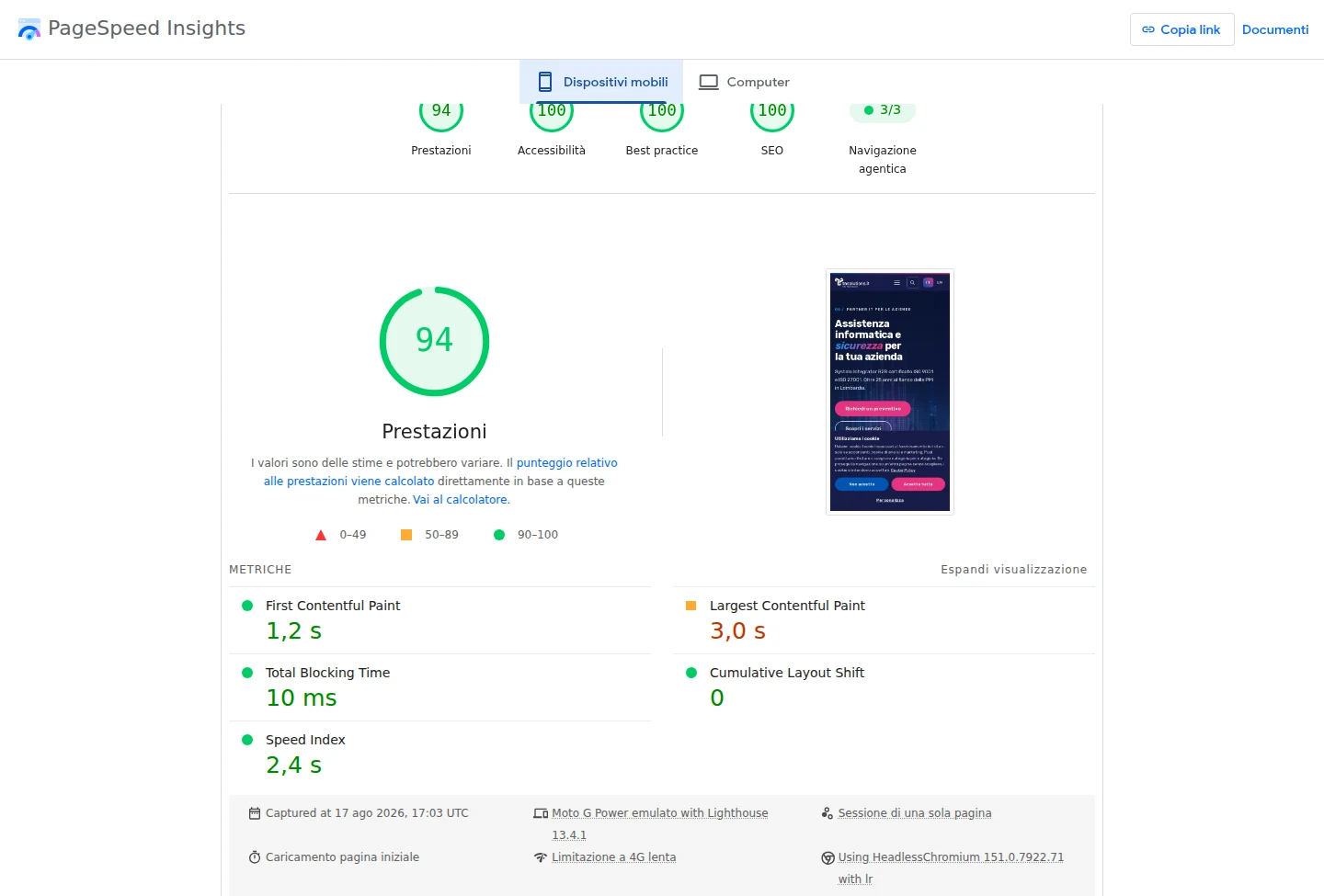
Google PageSpeed Insights, "Mobile" tab (interface in Italian), page analysed: the tnsolutions.it home page — report captured on 17 August 2026 at 17:03 UTC. The Performance score fluctuates between 94 and 98 across different runs on the same day (see the table above): this screenshot documents one real run, not the best score of the day.
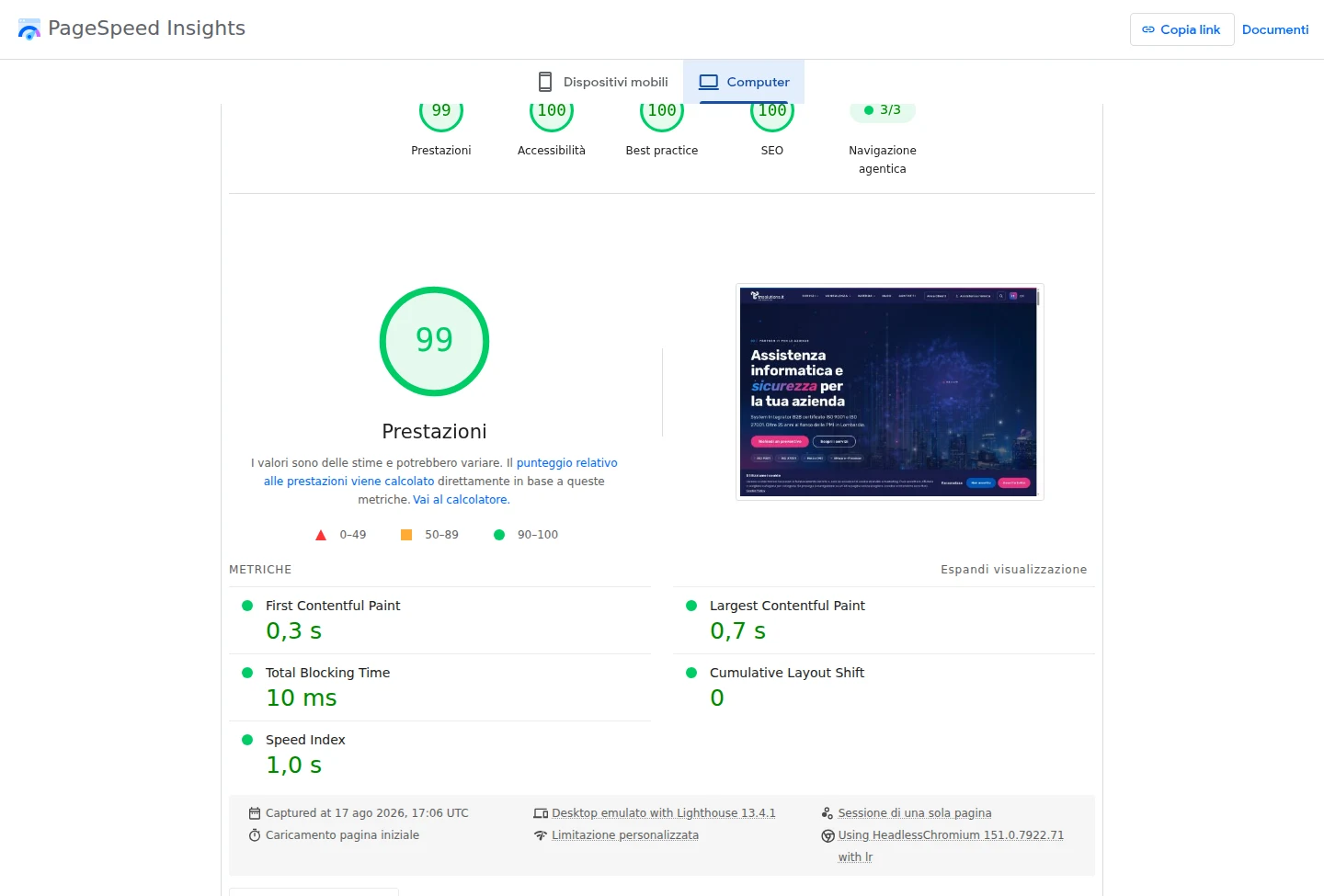
Google PageSpeed Insights, "Computer" (desktop) tab (interface in Italian), same page — report captured on 17 August 2026 at 17:06 UTC.
The procedures behind these numbers
None of this comes from flipping one switch. It is five separate interventions, applied between 16 and 17 August 2026:
content-visibilityacross every public template. The twelve service-page templates, the blog and the territorial landing pages tell the browser which parts of the page it can defer laying out. On a phone, which only has to paint what is visible in the first screen, that means not laying out the whole page before it becomes usable.- Three cache layers, all in RAM, none on disk. The reverse proxy's HTML micro-cache lives in a memory-backed partition (tmpfs) and answers in 40-60 milliseconds per page; the database has 2 GB of dedicated shared memory (shared_buffers), with a cache hit ratio close to 100%; the application's data cache (Next.js) has its own 512 MB. Three layers, three different lifetimes, none of them ever touching disk.
- Deferred hydration of non-critical components. The contact form, the search popup, the language switcher, the chat and the consent banner reach the browser as a static shell identical to the final one, and only become interactive when they are actually needed — not all at once on first load.
- Pre-computed Brotli compression, not generated on every request: the compressed file is already sitting there, and the proxy serves it without reprocessing anything.
- The page's main image loaded with a declared priority (preload and fetchPriority), so the browser knows from the very start which image to paint first, instead of discovering it while parsing the rest of the document.
What we tried and threw away
Two experiments from the same working window were rolled back, and we tell that part too, because it is as much a part of the method as the ones that worked:
- Lazy hydration of the navigation menu. Deferring the menu's interactivity looked like an easy win, since it is a small component. When measured, though, the delay it introduced in the response to a first mobile tap was not offset by anything meaningful: we removed the change and the menu now hydrates along with the rest of the page.
- Inline CSS extended beyond the critical path. Bringing more stylesheets into the HTML, not just the one needed for the first screen, cut the number of network requests but added bytes to every page that the browser still had to parse before it could paint anything. Measured head to head, the version with only the critical CSS inlined stayed faster: we kept that one.
The rule running through this whole case study is the same one here: form a hypothesis, measure it, and roll back if the measurement does not confirm it. That is not a compromise on the result — it is how the result gets earned, and it is why every number above is one we can defend on request.
The proprietary CMS: what it does that we could not do before
The heart of the project is the content management system. It is not a theme on an existing CMS: it is an application of ours, built around the way we work.
- Content and translations as linked pairs. Every page and every article knows its counterpart in the other language. The declarations search engines read are generated from that link: nobody writes them by hand, so nobody forgets them.
- Structured data generated from the content. The information engines read as data — page type, frequently asked questions, videos, organisation — is produced by the system from what is published, not typed into a separate field that drifts away from the text over time.
- Quality checks built in. The panel flags what is missing in real time: an absent description, a title that is too short, a page with no counterpart in the other language. Editorial quality becomes a list to close, not a hope.
- Redirect governance from the interface, with chain detection: no URL may point to another that itself points somewhere else.
- Internal search that ignores accents, with results ordered by real relevance — title before body, exact match before partial.
The archive as a tree, not a list
The content screen is where the difference from a general-purpose CMS becomes clear. Pages appear in their real hierarchy, split by language, with publication status and — next to each one — whether the version in the other language exists or is missing.
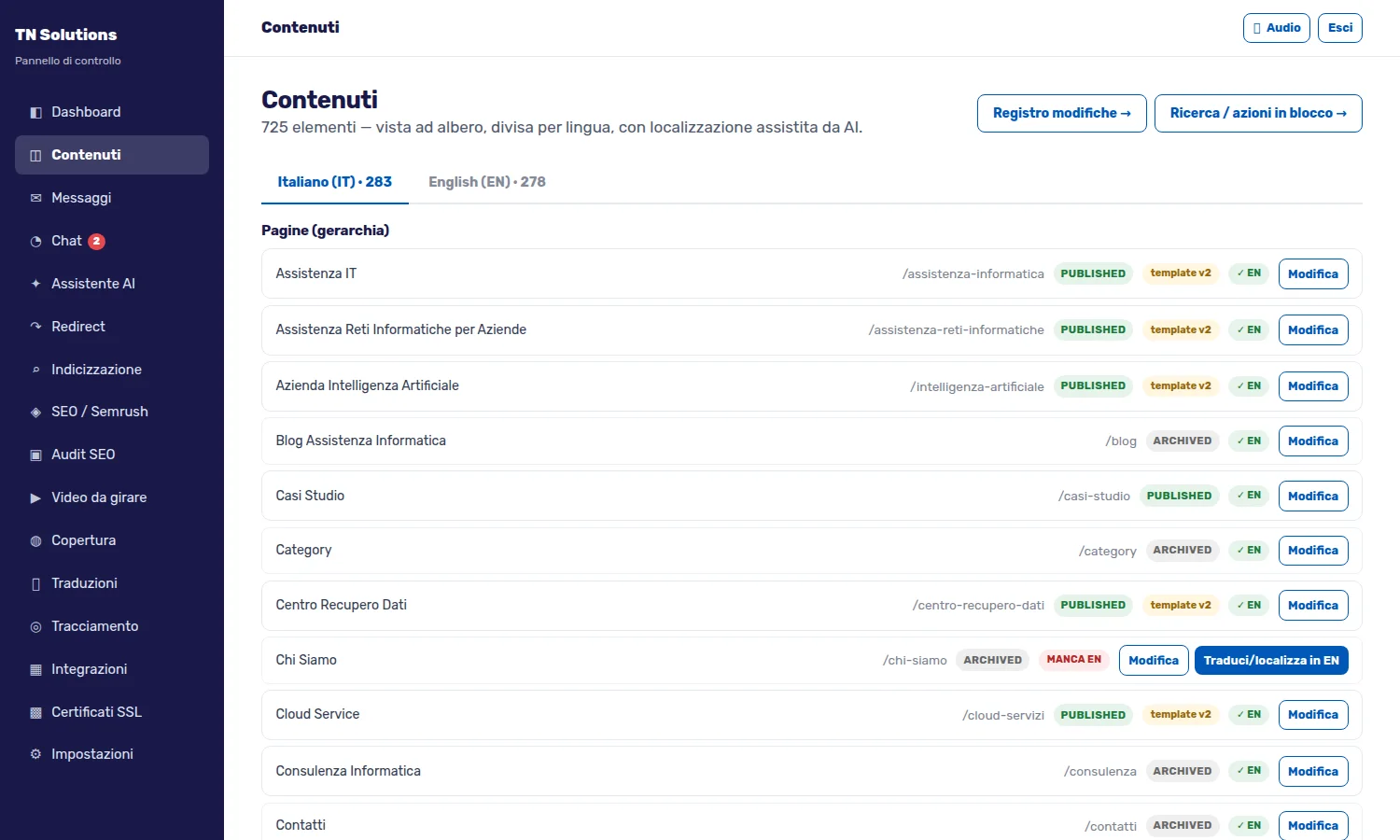
That small "EN missing" marker next to a page is why the site has no translation gaps: it is not a check someone has to remember to run, it is a condition visible in the list. And the button beside it starts assisted localisation, which is not the same as machine translation: it produces a first version in the target language, which a person reviews before publication.
Quality control as a panel, not a hope
The second screen is the built-in SEO analysis. It is not an external service plugged in: it is an engine of ours that walks the entire site, measures thirteen quality dimensions — on-page, structured data, accessibility, architecture, content depth, speed, internationalisation — and compares the result with direct competitors.
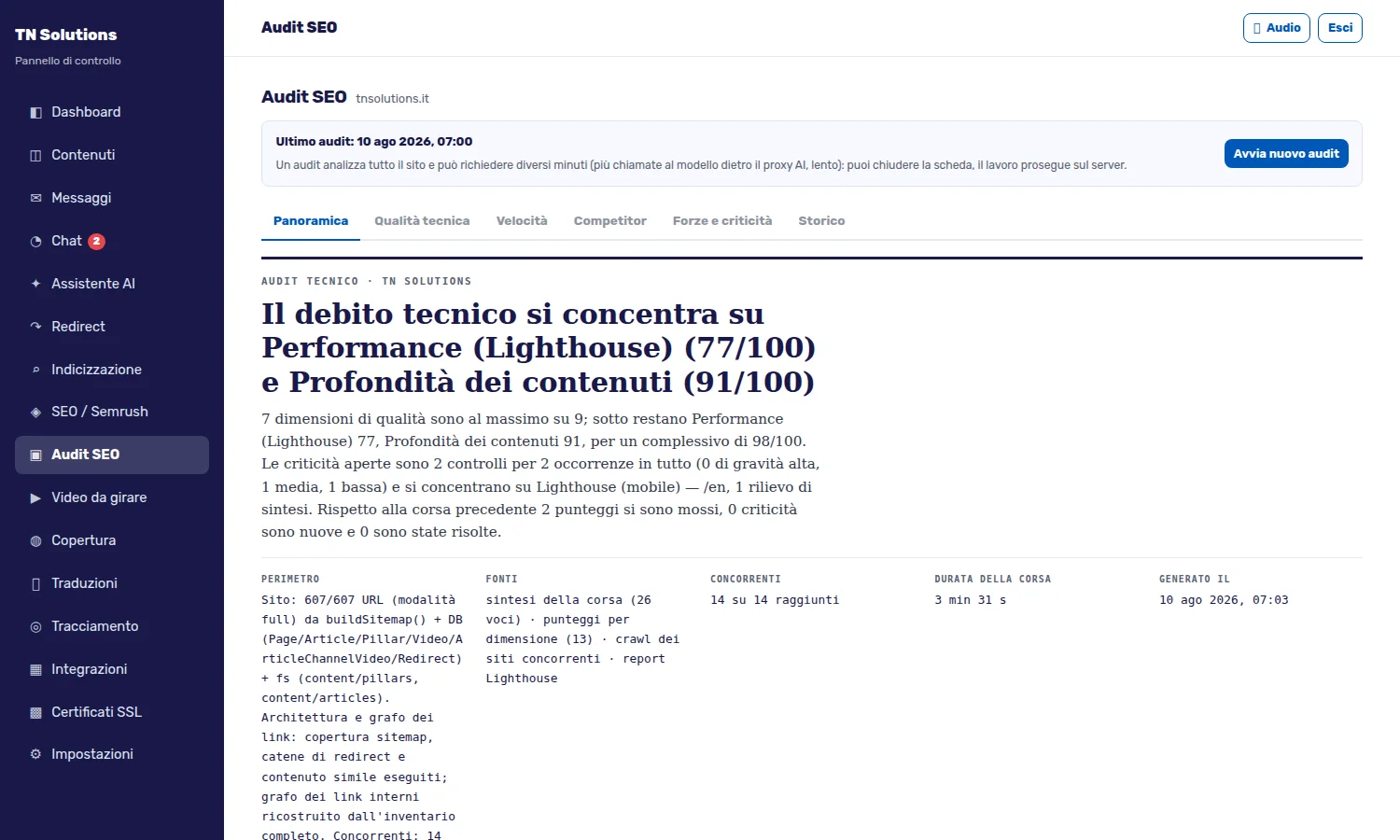
The value is not in the number. It is in three details: the analysis declares its own scope (how many URLs, from which sources), compares itself with the previous run stating what improved and what got worse, and turns findings into a list of things to do rather than a report to interpret. It is the same work an external consultant would bill by the day, available on demand and repeatable.
Alongside it are the panels for redirects — with automatic chain checking — for indexing, for territorial service coverage, for certificates and for chat. Each one was born from a real problem met while working, not from a feature list decided in a meeting.
Technical SEO: architecture, not tricks
The stated goal was to lose nothing of the ranking built over twenty-five years, and ideally to gain. The work concentrated on four fronts.
Stable, consistent URLs. Every piece of content has one valid address, declared as such. The alternative forms — with or without trailing slash, with or without prefix — all converge on it, in a single hop.
Sitemaps split by nature. Instead of one huge file, six thematic ones: pages, service areas, Italian articles, English articles, images, videos. A crawler understands sooner what it is looking at, and we notice sooner if a section starts losing pieces.
Languages declared correctly. Alternate versions declare each other only when they really are the same page in another language. Linking two different pieces of content because they discuss the same topic is a false statement, and engines treat it as one.
Content reachable by AI assistants too. Alongside the classic sitemaps we publish descriptive files aimed at conversational systems, and we do not block their crawlers. People search that way now as well: closing the door means disappearing from an entire channel.
Twenty-five years of URLs to normalise
This is the part of the project nobody sees and that is worth more than all the rest. A site that has been through three generations of technology accumulates broken URLs the way a house accumulates boxes in the basement: paths shaped by whichever CMS generated them, moved pages, closed sections, content produced by extensions no longer installed, external links pointing where nothing remains.
Ignoring them means throwing away earned authority: a link from an authoritative site to a page that answers "not found" is value dispersed.
The criterion we followed deserves a note, because it goes against the grain. Not everything should be redirected. A URL with no sensible equivalent must answer "this does not exist": sending it to the home page is a misleading redirect, which engines recognise and treat as such. Redirecting is an act of correspondence, not a way of making errors disappear from a report.
A second criterion concerns duplicate content. While cleaning the archive we found pages that had survived in two versions on the same subject: the old, generic one and the rewritten one. Two URLs competing for the same query weaken each other. We consolidated them, sending the superseded version to the good one: authority adds up instead of splitting.
The visual identity: Hector's brain on the home page
A company that builds artificial intelligence cannot have a website that looks like everyone else's. Hence the choice that most characterises the portal: the animation of Hector's brain, pulsing in the first screen of the home page.
It is not a decoration taken from a library. It is a custom-written graphics engine — around 900 lines that draw a network of neurons and fibres on a digital canvas, with impulses running through it and a status indicator signalling the system is alive. The palette is the brand's, and the movement is slow and continuous: it has to read as something that thinks, not as an animation on a loop.
The reason for the integration is precise. Hector is not a service we buy and resell: it is our own ecosystem, and the home page had to say so before any text did. A visitor understands within two seconds that here artificial intelligence is not a line item but a product — and the same entity they see pulsing is the one they can talk to, by opening the chat a few lines below.
Seven versions before the right one
The instructive part is how we got there, because it is the kind of work nobody usually talks about.
A continuous animation competes with the browser exactly in the window where the page has to become usable. The first versions worked beautifully on a workstation and clearly worsened the responsiveness metrics on the throttled mobile profile Google uses to assess sites. We changed approach seven times, and each time we re-measured instead of trusting our impression:
- starting it immediately cost too much in initial responsiveness;
- deferring it to the end of loading made it appear four seconds after the text, with a "bolted-on" effect worse than the problem;
- filling the wait with a graphic placeholder solved the aesthetics but added a pointless element on small screens.
The solution came from a measurement, not an idea: the cost applied only to the mobile branch, and that was precisely the context where the animation looked worst — hundreds of points squeezed into very little width. On small screens the script is therefore not even requested: no network, no processing, no cost for the entire life of the page. On desktop it starts immediately, with a fade-in of just over two seconds that makes it emerge rather than switch on.
Three final details, the ones that separate an effect from a job done properly:
- It moves nothing. The element lives outside the document flow, so its appearance does not push the text around — one of the parameters Google explicitly measures.
- It respects those who ask for less motion. If the device declares that system preference, the animation adapts.
- The drawing was moved off the main thread where the browser allows it, so the interface stays responsive while the neural network keeps pulsing.
It is a single decorative element. We gave it the same method we give a firewall: hypothesis, measurement, verification.
User experience and mobile
The site was designed starting from the phone, not adapted afterwards. Menus reachable with a thumb, contact actions always within reach, content that reorganises rather than shrinks, contrast ratios checked against accessibility criteria.
One detail we mention because it took more discussion than expected: the animations. They were kept — because a completely static site reads as neglect — but they respect the system preference of anyone asking for less motion. Whoever has enabled that setting on their device sees the site still. It is one line of code and nobody notices it, and it is exactly the kind of care that distinguishes work done properly.
Hector: the site's AI chat and its APIs
Hector's chat is live on the site, our conversational assistant. It is not a widget bought and pasted in: it is a component of our Hector ecosystem, connected to the platform through dedicated APIs.
The practical difference from a generic chatbot comes down to three points.
It knows our content. Every page and every article has, in the database, a numerical representation of its meaning — a vector. When a question arrives, the system looks for the content closest in meaning, not in wording, and puts it in front of the model. It is not a model improvising on what it remembers: it is a model handed the relevant documents, taken from the site.
It hands over when needed. A conversation can be picked up by a person from our team, seamlessly. The automated assistant handles frequent questions, the technician steps in where real expertise is required.
The data stays ours. Conversations live on our infrastructure, inside the perimeter described above. That is why we built Hector instead of adopting an external service: for a company that works in information security, sending its clients' conversations to a third-party platform would be a contradiction.
The problems we ran into, and how we solved them
A case study without problems is a brochure. Here are the four most instructive ones.
The certificate before the DNS, not after. The old site had a directive forcing browsers to use the encrypted connection exclusively, remembered for six months. The consequence: the moment the domain name started pointing at the new server, anyone who had visited the site before could not reach it unencrypted even for an instant — and the certificate on the new server was not there yet. The lesson, now written into our procedure: with that directive active, the certificate is issued before the switch, never after.
Server error instead of "page not found". Some probing URLs — configuration files, sitemaps of systems no longer installed — produced an internal error rather than an honest "this does not exist". For a search engine the difference matters: the error means "try again", the not-found means "take it off the queue". Cause identified, fixed, verified against the real cases taken from the logs.
Cache hiding the work done. More than once a change appeared to have had no effect, and the explanation was always the same: the cached copy had not expired yet. It cost us analysis time on code that was already working. Hence the decision to document, for each level, how long it lives and how it is cleared.
The release that took the site down. Rebuilding the application over the folder in use by the running process left the site unusable for the duration of the operation. Now the new version is built alongside the one in service and the two swap only once the build has succeeded: downtime went from a couple of minutes to under a second, and a failed release no longer touches anything. On this point, measured with an external probe throughout the whole operation, 98% of samples saw no interruption at all.
Who did what
A project like this is not the work of a department: it is the work of people who talk to each other.
The IT design and the creation of the infrastructure bear the signature of Marco Ursoleo, CEO of TN Solutions. The underlying architectural choice is theirs — keep everything in house, on open technologies, with the network perimeter designed before the application rather than after — and so is the layout of the layers you saw in the first diagram: where traffic passes, what filters it, which component may talk to which. The same hand guided the integration of Hector into the platform: making the AI ecosystem talk to the site through dedicated APIs, keeping data and conversations inside our own infrastructure, was an architectural decision before it was a product one.
This is not expertise invented for this project. It is the same expertise applied for over twenty-five years to clients' infrastructures: here it was turned inwards, and the site is the visible result.
Around that design worked the technical and editorial team: those who built the CMS and its interfaces, those who handled design and accessibility, those who rewrote and translated the content, those who inventoried twenty-five years of historical URLs one by one. That last part in particular is patient, thankless work — one thousand and eighty-four rules are not written in an afternoon — and it is the reason the ranking asset built over the years arrived intact on the other side.
The result belongs to no one in particular, and that is exactly the point: a well-designed infrastructure, a proprietary AI product and rigorous editorial work, held together by the same people who answer the phone when a client calls.
The project in numbers
| Item | Value |
|---|---|
| Published articles | 401, in two languages |
| Service and corporate pages | 162 |
| URLs declared in the sitemaps | 1,109, across six thematic files |
| URL normalisation rules | 1,084 |
| Page weight reduction | −19% with identical content |
| Downtime during a release | from several minutes to under a second |
| PageSpeed Insights mobile score, home page (17/08/2026) | 94-98 out of 100 |
| Server TTFB | 44-62 ms, down from ~1.2 s before the optimisation work |
Did you like this journey?
If you have read this far, you have probably recognised something of your own situation: a site that has grown in layers, a CMS that demands more maintenance than it gives back, an archive of content that has value and that nobody dares touch for fear of losing rankings.
What we did for ourselves, we can do for your company. Not necessarily all of it, and not necessarily at once: you can start with whatever weighs most — securing the infrastructure, recovering the historical URLs, performance, or the complete editorial platform.
What we bring is not an off-the-shelf template. It is the method you have just read: understand first, measure during, verify afterwards. And responsibility for every layer, from the firewall to the page the visitor sees, resting with a single point of contact.
Let's talk about your project — the first consultation is free, and from this page you can also open Hector's chat and ask us your first question right away.
Frequently asked questions
The questions we get about this project
Why build a proprietary CMS instead of using WordPress?
Because the goals were incompatible with what a general-purpose CMS gives you by default: direct control over the HTML produced, structured data generated from the content, translations managed as linked pairs, and performance beyond the ceiling reachable through extensions. The opposite still holds: when a client's goals are compatible with WordPress, we install WordPress. The choice follows the project, not the fashion.
Is a proprietary site harder to maintain?
It is different. There are no dozens of extensions by different authors to keep aligned, so routine maintenance is simpler and more predictable. In exchange you need people who know the system: that is why the platform is documented internally and built on open, widely used technologies rather than exotic components. Independence is only worth something if someone else can take over.
What happens to rankings during a migration like this?
It depends almost entirely on URL handling. If every historical page finds its destination through a verified permanent redirect, authority transfers. If someone "solves" it by sending everything to the home page, it is lost. That is why the URL inventory has to be built from the real requests recorded by the server, not from a list compiled from memory.
What is the difference between a firewall and an intrusion detection system?
The firewall decides whether traffic is allowed; the detection system watches the allowed traffic and recognises the patterns typical of an attack. You need both: the first closes the doors that should not be open, the second notices who is knocking suspiciously at the ones that must stay open.
Why two separate environments, if there is only one site?
Because it is the only way to verify a change without using visitors as testers. Every change is born on the staging environment, is looked at on screen and tried out, and only then reaches production. The cost is one more virtual machine; the benefit is not discovering a problem from the client who reports it.
Does Hector's chat replace talking to a technician?
No, it comes before it. It answers recurring questions by retrieving information from the published content, and when a request goes beyond that scope the conversation passes to a person on our team without the user having to start over.
What scores does the site get on Google today?
On the home page, on mobile, PageSpeed Insights scores between 94 and 98 out of 100 (measured on 17 August 2026), with accessibility, best practice and SEO all at 100. On our internal desktop Lighthouse bench the main pages sit between 98 and 100. Those are lab numbers: the field data Google collects from real visitors (Core Web Vitals) takes several weeks to catch up with a change of this size, and the current 28-day window still partly reflects the previous site.
05 / Related services
The services we used in this project
Every piece of this work is a service we offer to clients: you can start from whatever weighs most in your situation.


Related articles
More case studies
What we did for ourselves, we can do for your company
It does not have to be everything at once: you can start from whatever weighs most — securing the infrastructure, recovering historical URLs, performance, or the complete editorial platform.
06 / Talk to an expert
Talk to the people who designed this infrastructure
Tell us how your site is built today, and we will call you back within one working day.
Describe the current situation — the CMS, the content archive, the problems costing you time: one of our engineers will get in touch for a first free discussion, with no obligation.